How toll-free approval works
Register a toll-free number with Twilio or Vonage: the form, the review, and what to do if it is rejected.
US carriers block texts from a toll-free number until it is verified. We file the verification for you, on your own Twilio or Vonage account, so it stays yours if you ever leave. You answer about five minutes of questions, most of them filled in already, and a person at the carrier reviews it, usually within a few business days.
Every filing goes through the same four steps, and the number’s page shows where it is:
- Sent to us. You fill in the form and click Send for review.
- We check it. We read it over before it goes to the carrier, so a typo doesn’t cost you a rejection.
- The carrier reviews it. Twilio or Vonage, whichever the number is on.
- Verified. The number can send.
Start the registration#
Open Messaging Setup → Numbers and click the number. A number that isn’t registered says so, with Register this number:
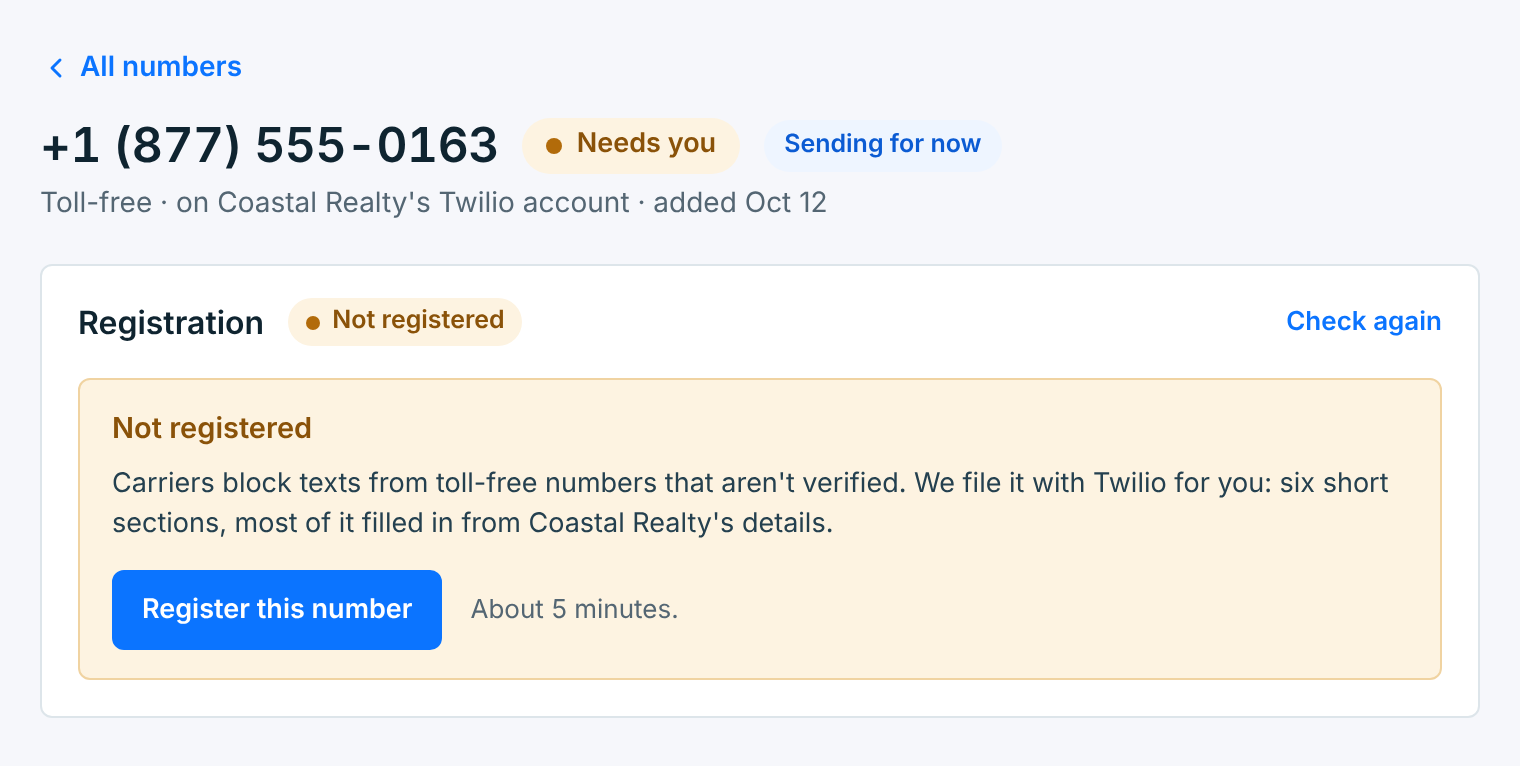
The Register it button on the Numbers list, and Register this number on the dashboard, open the same form.
The form#
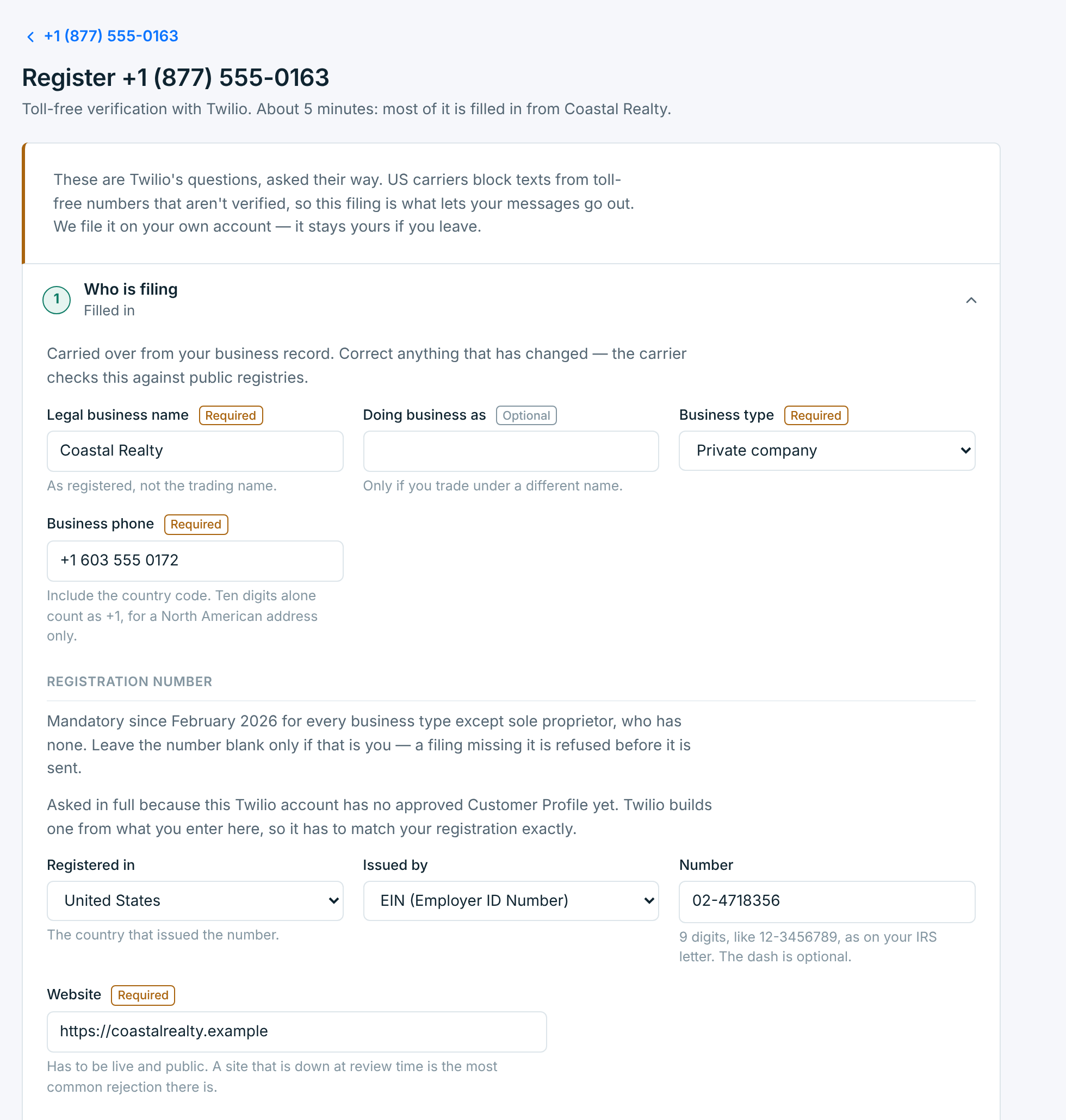
Six sections, asked the carrier’s way. Most of it is filled in from the business. Each section’s heading says how much of it is filled in, and turns green when it’s done. Click a heading to open it.
| Section | What it asks |
|---|---|
1 Who is filing |
Your legal business name (as registered, not the trading name), doing business as if you trade under another name, business type, business phone with the country code, your registration number, and your website. The carrier checks these against public registries. |
2 Business address |
Where the business is registered. |
3 Who the carrier contacts |
A person at the business the carrier can contact about the filing. |
4 What you will send |
The kinds of messages, what they are for, real samples, and how many a month. |
5 How people opt in |
How people sign up, and the page or words they see when they do. |
6 Privacy policy and terms |
The two links from the business’s details. Your webforms show the same links. |
The registration number is required for every business type except sole proprietor. In the US it is your EIN, 9 digits like 12-3456789, as on your IRS letter.
On Twilio, if your account has no approved business profile (Customer Profile) yet, section 1 asks for it in full: Twilio builds one from what you enter, so it has to match your registration exactly.
What you will send#
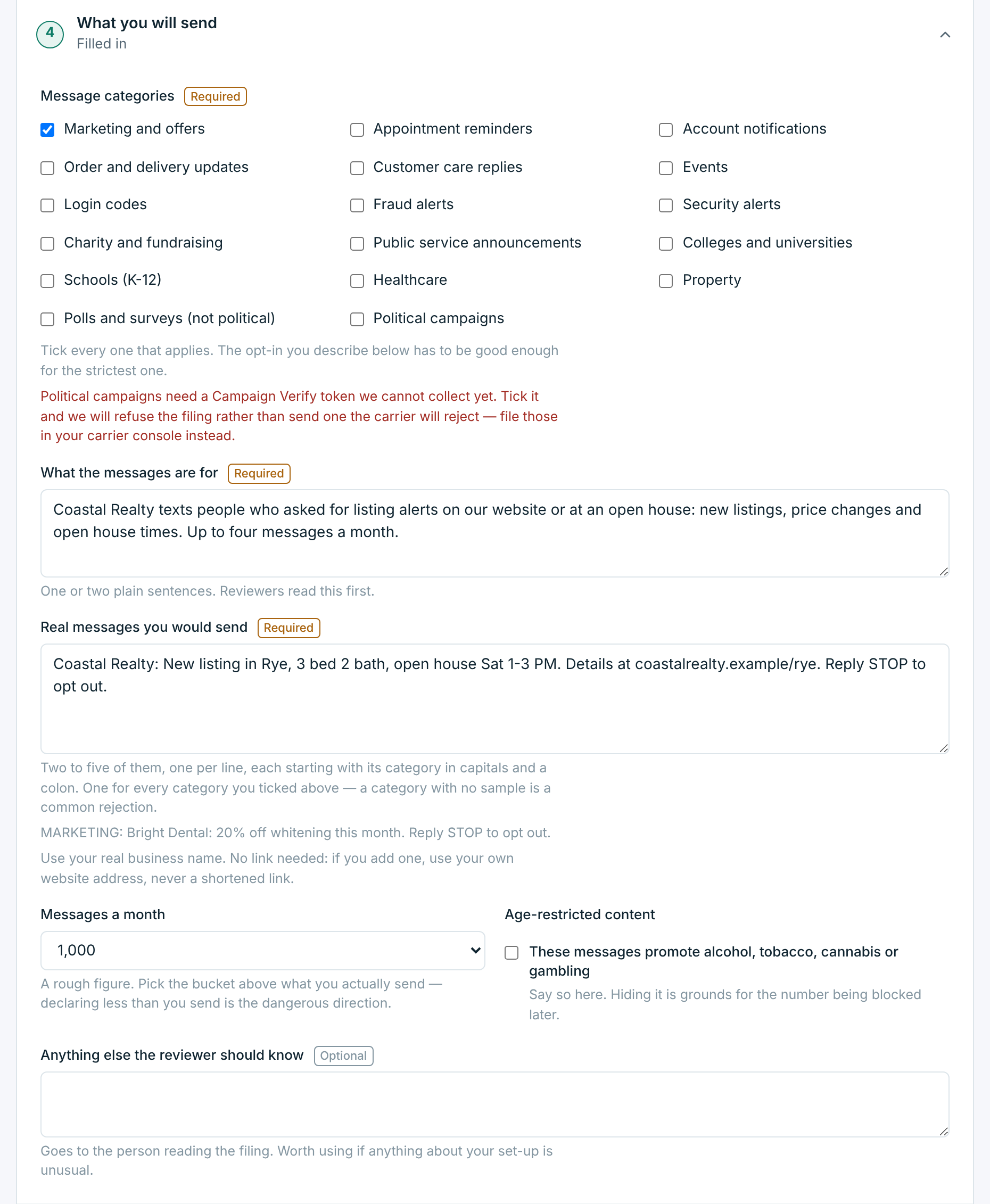
- Message categories. Tick every one that applies. The way people opt in has to be good enough for the strictest one.
- What the messages are for. One or two plain sentences: who sends, who gets them, what they say and why. Reviewers read this first.
- Real messages you would send. Two to five, one per line, each starting with its category in capitals and a colon, one for every category you ticked. Use your real business name. If you add a link, use your own website address, never a shortened link.
- Messages a month. Pick the bucket above what you actually send. Declaring less than you send is the dangerous direction.
- Age-restricted content. Tick it if the messages promote alcohol, tobacco, cannabis or gambling. Hiding it is grounds for the number being blocked later.
How people opt in#
This is the part filings fail on. The carrier wants to see what the person saw when they handed over their number.
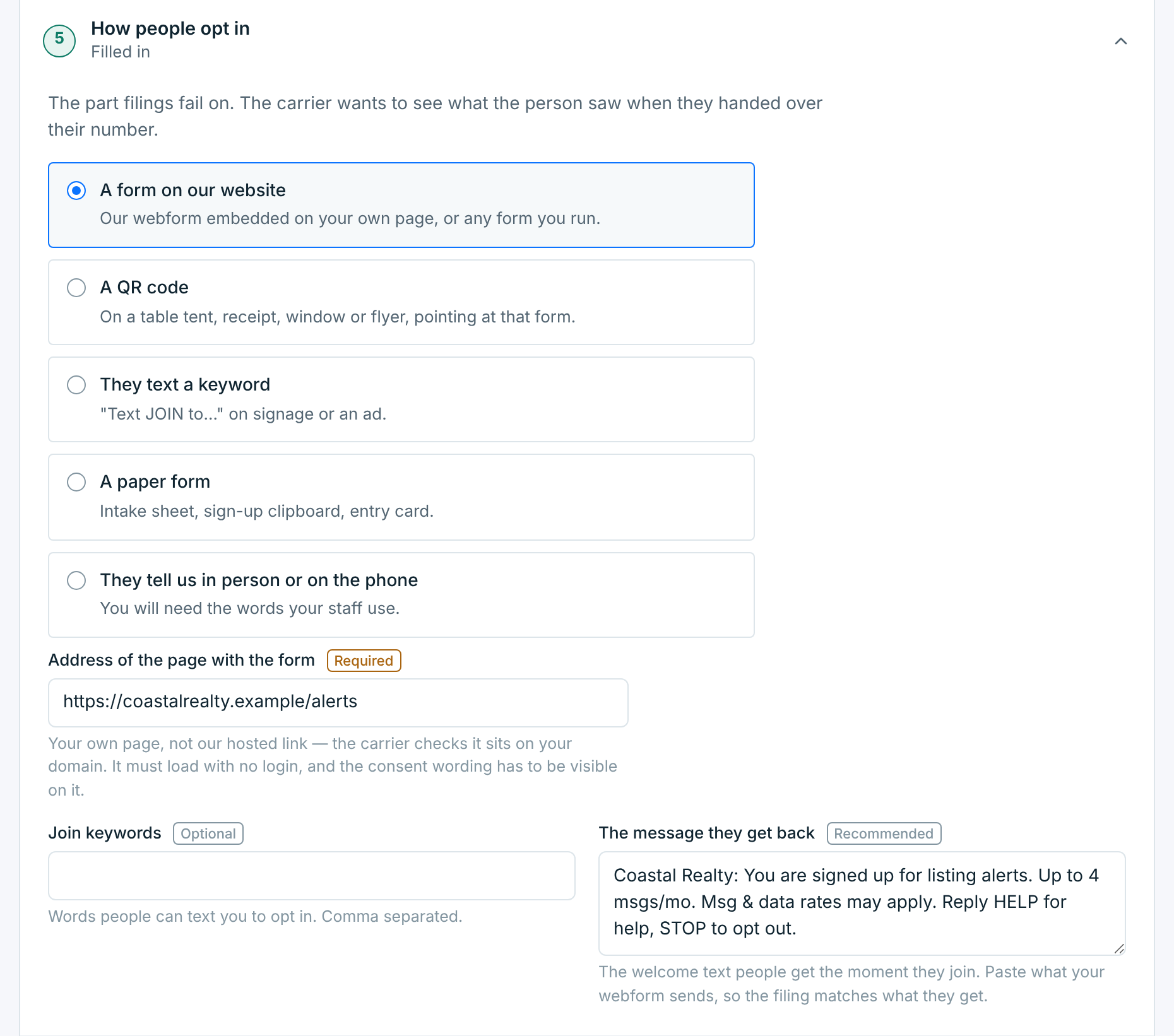
- Pick how people sign up: a form on your website, a QR code, a keyword, a paper form, or in person or on the phone.
- For a form, give the address of your own page with the form on it, not our hosted link: the carrier checks it sits on your domain. It must load with no login, and the consent wording has to be visible on it. A TextScaleHQ webform embedded on your site does all of this; see Share and embed a webform.
- For a paper form, or sign-up in person or on the phone, the carrier needs the exact words your staff use.
- The message they get back is the welcome text people get when they join. Paste what your webform sends, so the filing matches what they get.
Send it#
When every section is filled in, click Send for review. If something required is still empty, the button opens that section and points at the field instead.
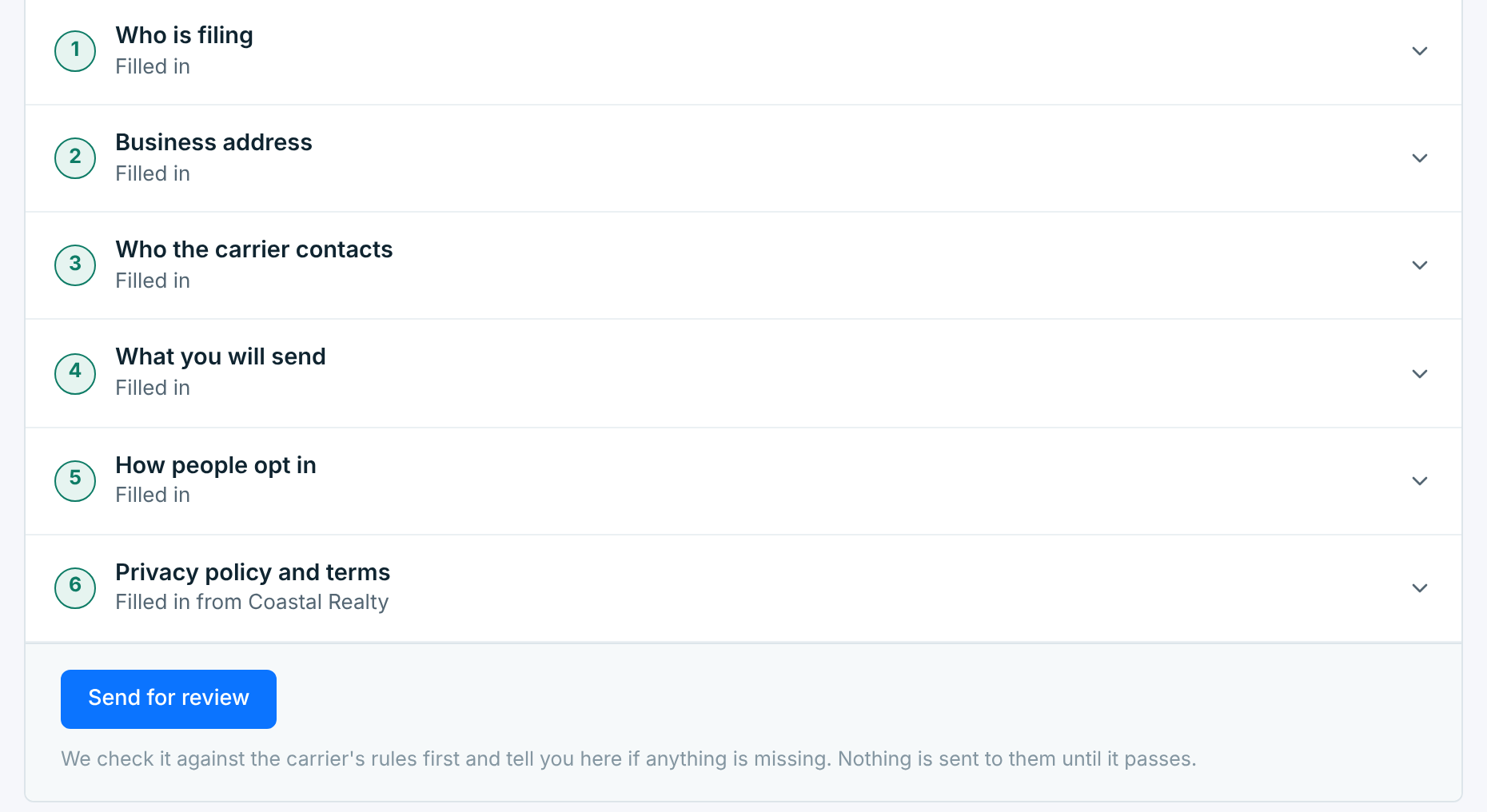
We check the filing against the carrier’s rules first and tell you on this page if anything is missing. Nothing goes to the carrier until it passes.
While it’s reviewed#
The number’s page follows the filing. First it is with us:
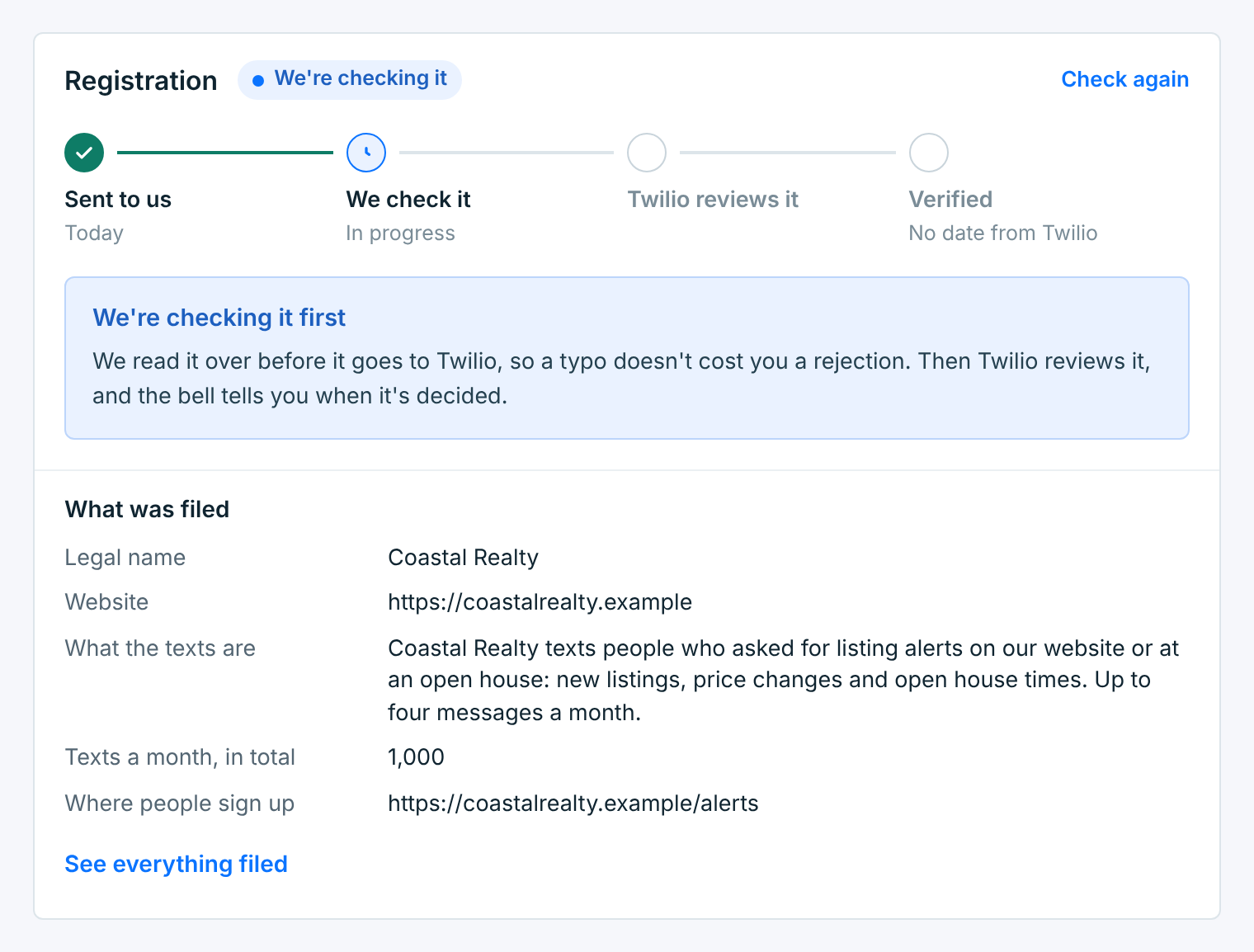
If we find something the carrier would reject, we send it back before filing it, with the reason and a note: the number shows Needs a change and a Fix it button. Nothing has gone to the carrier yet, so it doesn’t count against you. Fix it opens the form with what to change at the top; change it and click Send for review.
Then it is with the carrier:
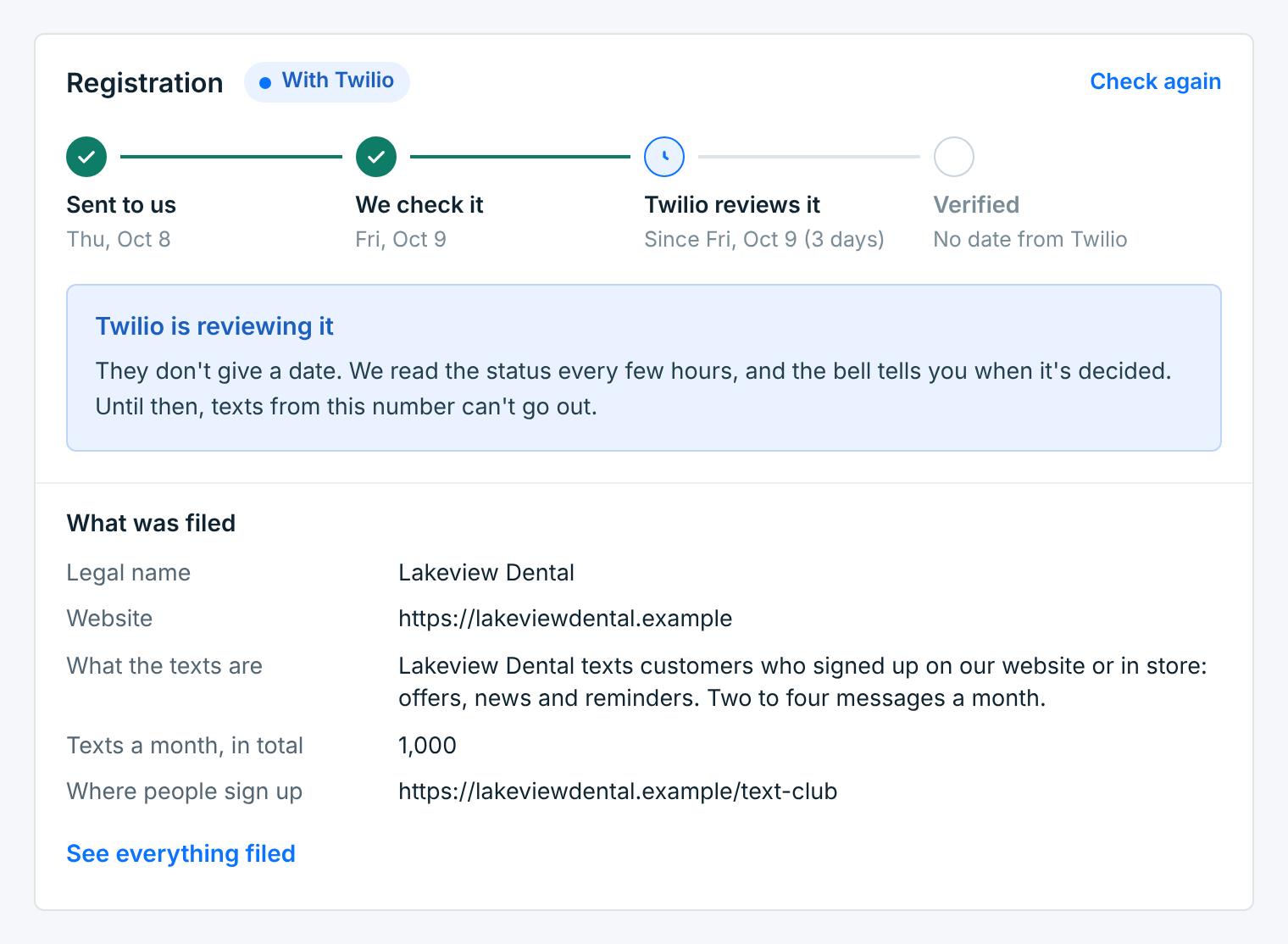
Carriers don’t give a date; most numbers are approved in a few business days. We read the status every few hours, and Check again reads it right now. You hear when it’s decided: in the bell at the top of the dashboard, and by email.
Until the number is verified, texts from it can’t go out. Campaigns you schedule meanwhile wait for it. Use the time to add your contacts and build a webform.
Verified#
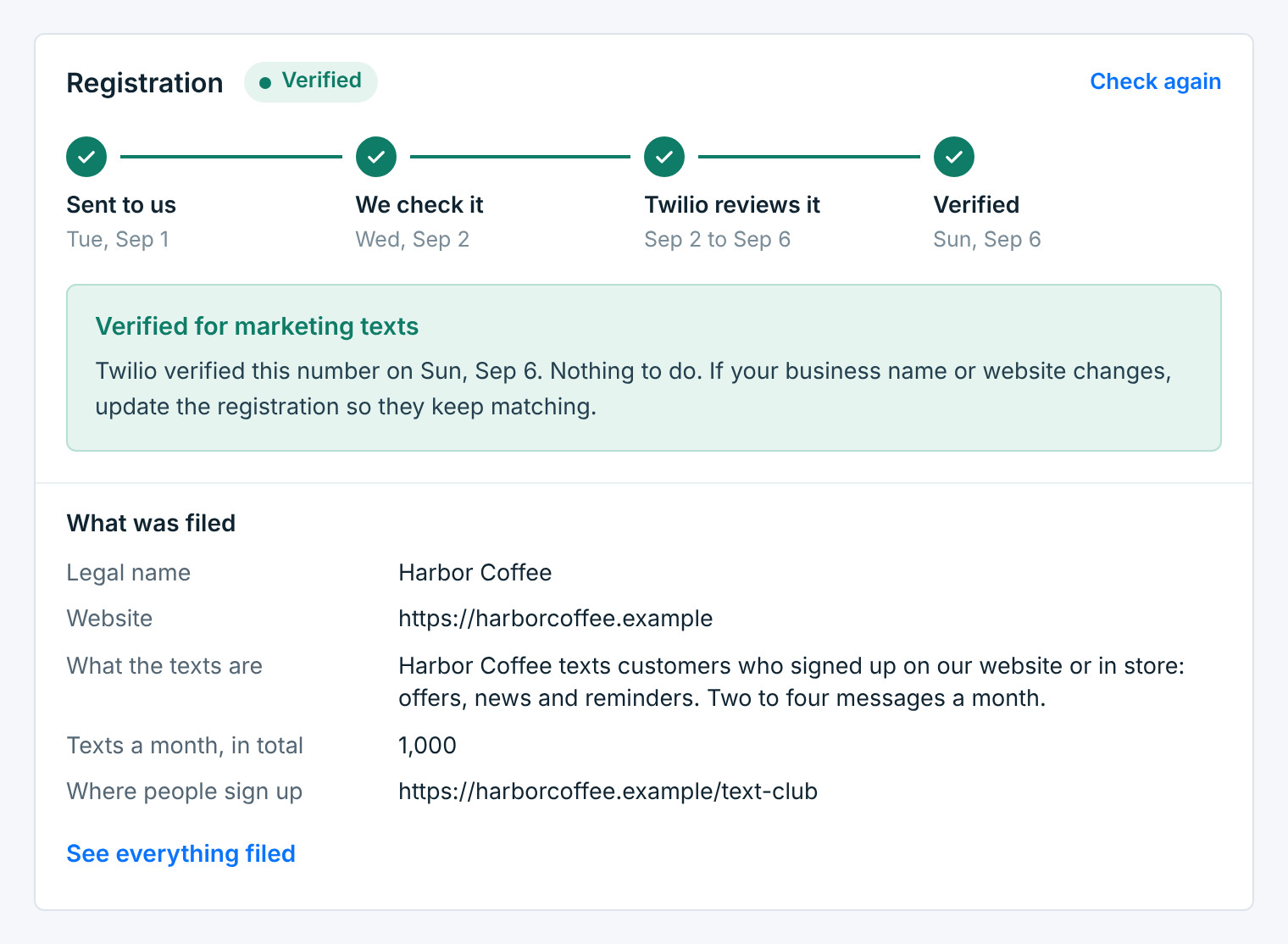
Nothing more to do. If your business name or website changes, update the registration, so the carrier keeps seeing the same details you text with.
If it’s rejected#
The number’s page gives the carrier’s reason in plain words, with its code, and marks the field it is about under What was filed:
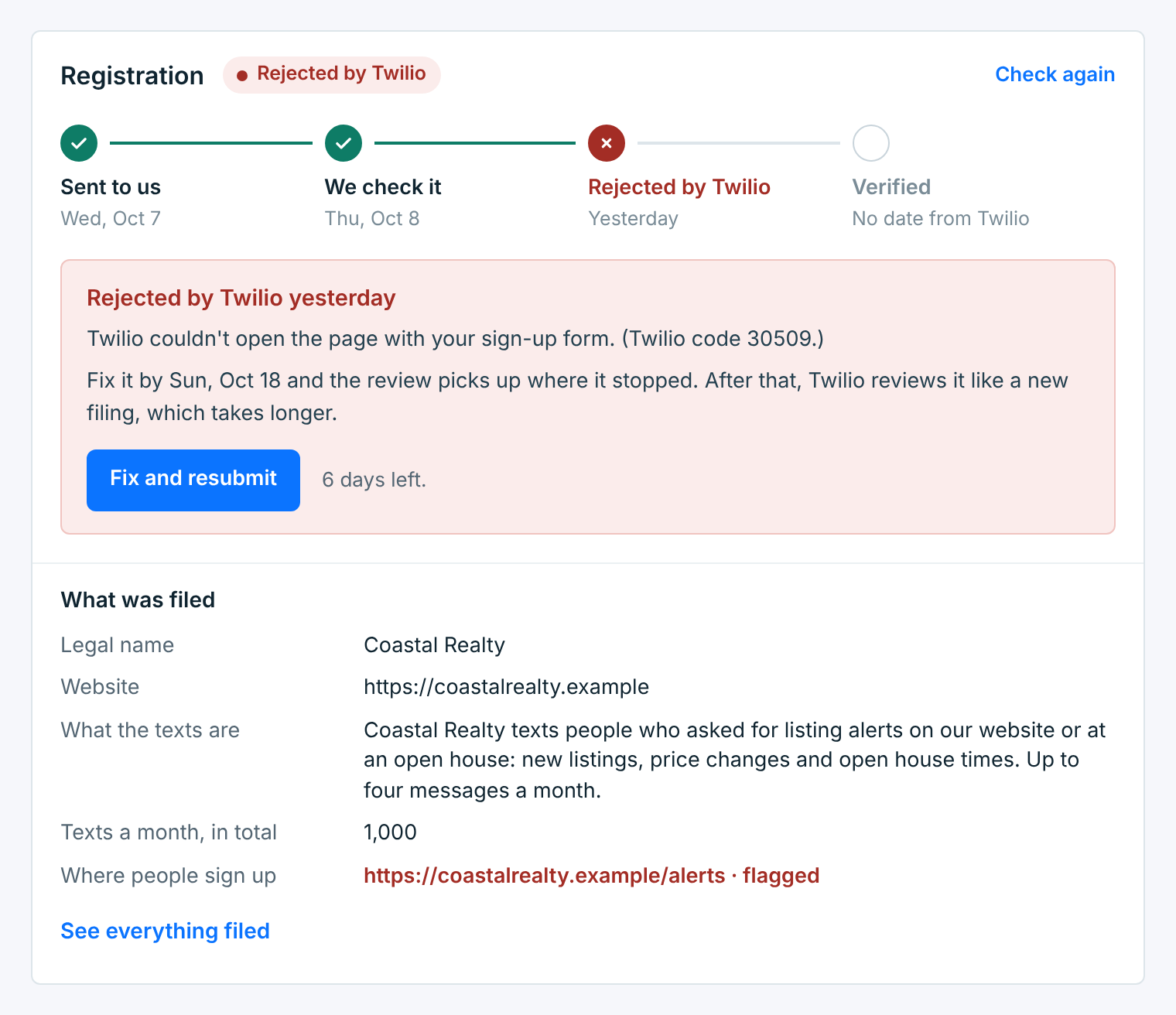
On Twilio, fix it within 7 days of the rejection and the review picks up where it stopped. The page shows the date and the days left. After that you can still fix it and resubmit, but Twilio reviews it like a new filing, so it takes longer.
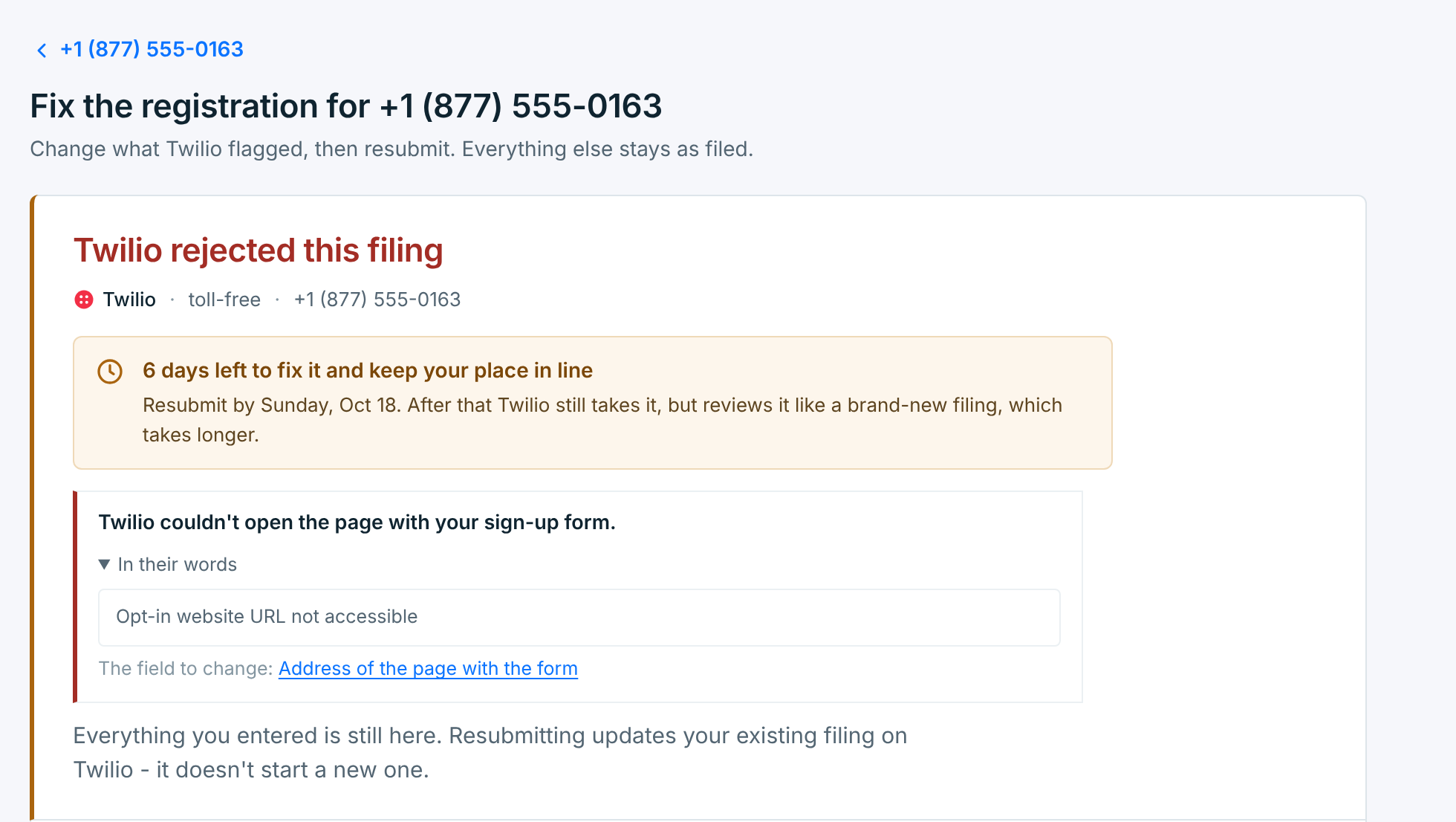
Click Fix and resubmit. The form opens with the carrier’s reason at the top, in our words and in theirs, and the days you have left:
Everything you entered is still there, and each section says As filed. The section the carrier flagged is open, with the field marked:
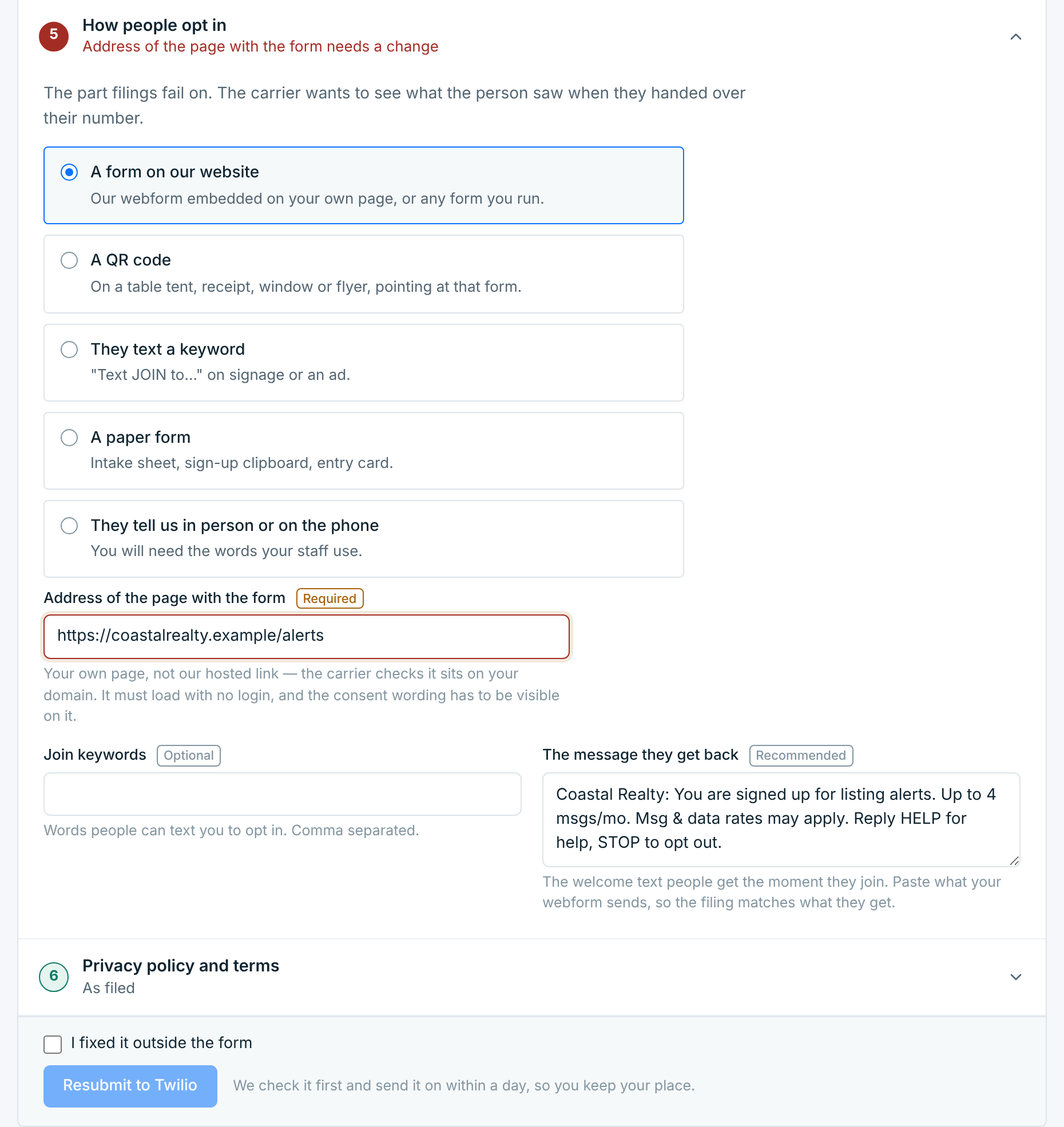
Change the flagged field. If you fixed the problem somewhere else, on your website for example, tick I fixed it outside the form; until you do one or the other, the button stays greyed out. Then click Resubmit to Twilio. We check it first and send it on within a day, so you keep your place. A resubmit updates your existing filing; it doesn’t start a new one.
Other outcomes#
| The page says | What it means |
|---|---|
Twilio couldn't accept the filing |
Twilio refused it before reviewing it, so it doesn’t count against you. Change what they point at and file it again. |
Twilio won't reopen this filing |
Twilio closed it, so it can’t be edited. Start over files a new one (nothing is deleted until you file), or ask Twilio Support to look again, or use a different number. |
Twilio doesn't allow these texts on toll-free |
The kind of message isn’t allowed on toll-free numbers at all, so rewording won’t change it. See your options explains the appeal, or file for a different use. |
Couldn't be filed |
It didn’t reach the carrier. Open it, check the details and send it again. |
On Vonage#
A Vonage number is registered the same way: the same six sections, asked Vonage’s way, and the same four steps.
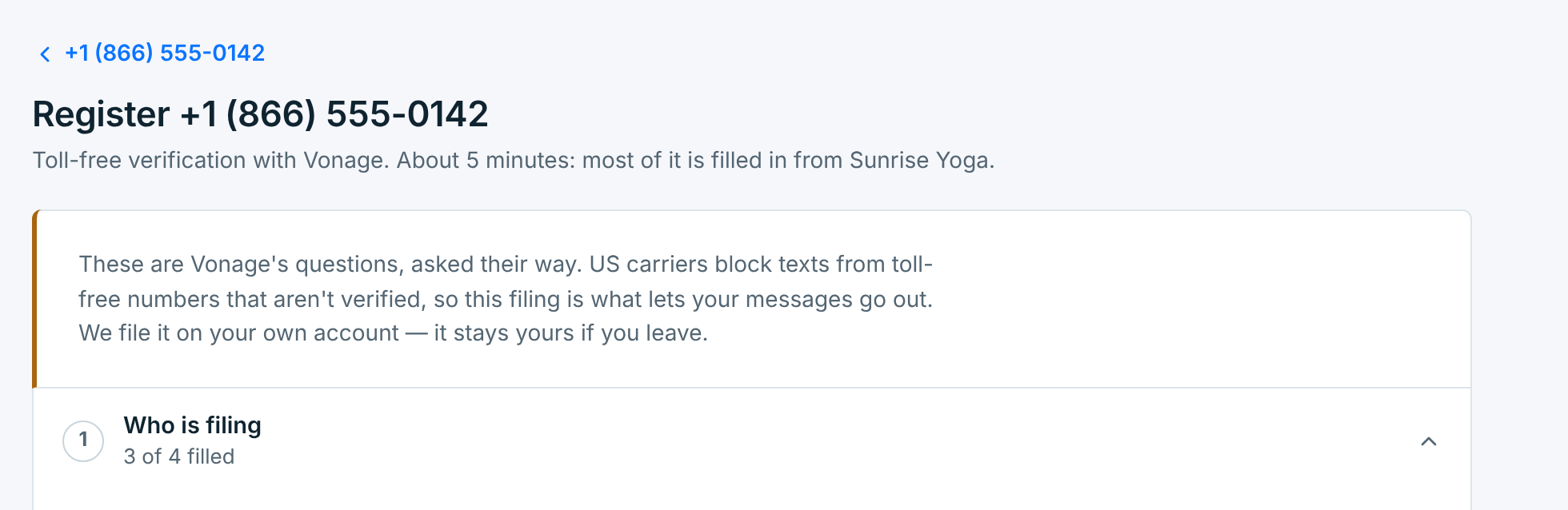
- When Vonage wants something changed, the page says Vonage asked for changes. There is no 7-day window: fix it and resubmit when you’re ready.
- The status updates when we next read your Vonage account, every few hours, or right away with Check again.
What carriers check#
Most rejections come down to a handful of things. Check these before you send:
- Your website is live and public, shows your business name, and doesn’t ask for a login. A site that is down at review time is the most common rejection there is.
- Your legal name, business type and registration number match your official registration.
- Your samples match what you said the texts are for, name your business, and don’t use shortened links.
- The sign-up says plainly that people are agreeing to texts: what for, how often, “Msg & data rates may apply”, “Reply HELP for help” and “Reply STOP to opt out”, with links to your terms and privacy policy right next to it. Any texting checkbox starts unticked and is separate from email and calls.
- Your privacy policy says you never share opt-in data, and your terms cover the texting details.
- Your HELP reply names your business and says how to reach you. See Replies, STOP and HELP.
Already got your toll-free number verified before you joined? There is nothing to file: we read the verification from your account. A local (10DLC) number works too, if its campaign is already approved in your carrier account. We only file toll-free numbers.