How we keep your texts compliant
What TextScaleHQ does for every text, what's up to you, and what isn't covered for you.
Marketing texts in the US have rules. Some come from the law, mainly the Telephone Consumer Protection Act (TCPA). Others come from the phone carriers, which can block a number that breaks them. They come down to a few things:
- get permission first;
- say who you are;
- let people stop, and stop when they ask;
- don’t text at night;
- keep the proof.
TextScaleHQ builds most of these into every text, so they can’t be forgotten. This guide covers what’s done for you, what’s up to you, and where each rule is explained in full.
These guides explain how TextScaleHQ works. They aren’t legal advice. If you’re not sure about your own texts, ask a lawyer who knows texting rules.
What’s done for every text#
| Rule | What TextScaleHQ does |
|---|---|
Permission first |
Everyone you text joined in a way that records their agreement: they ticked the consent box on your webform, texted your keyword, your app sent them with "consent": 1, or you confirmed they agreed when you added or imported them. The proof stays with each contact. See What counts as opt-in. |
Who it's from |
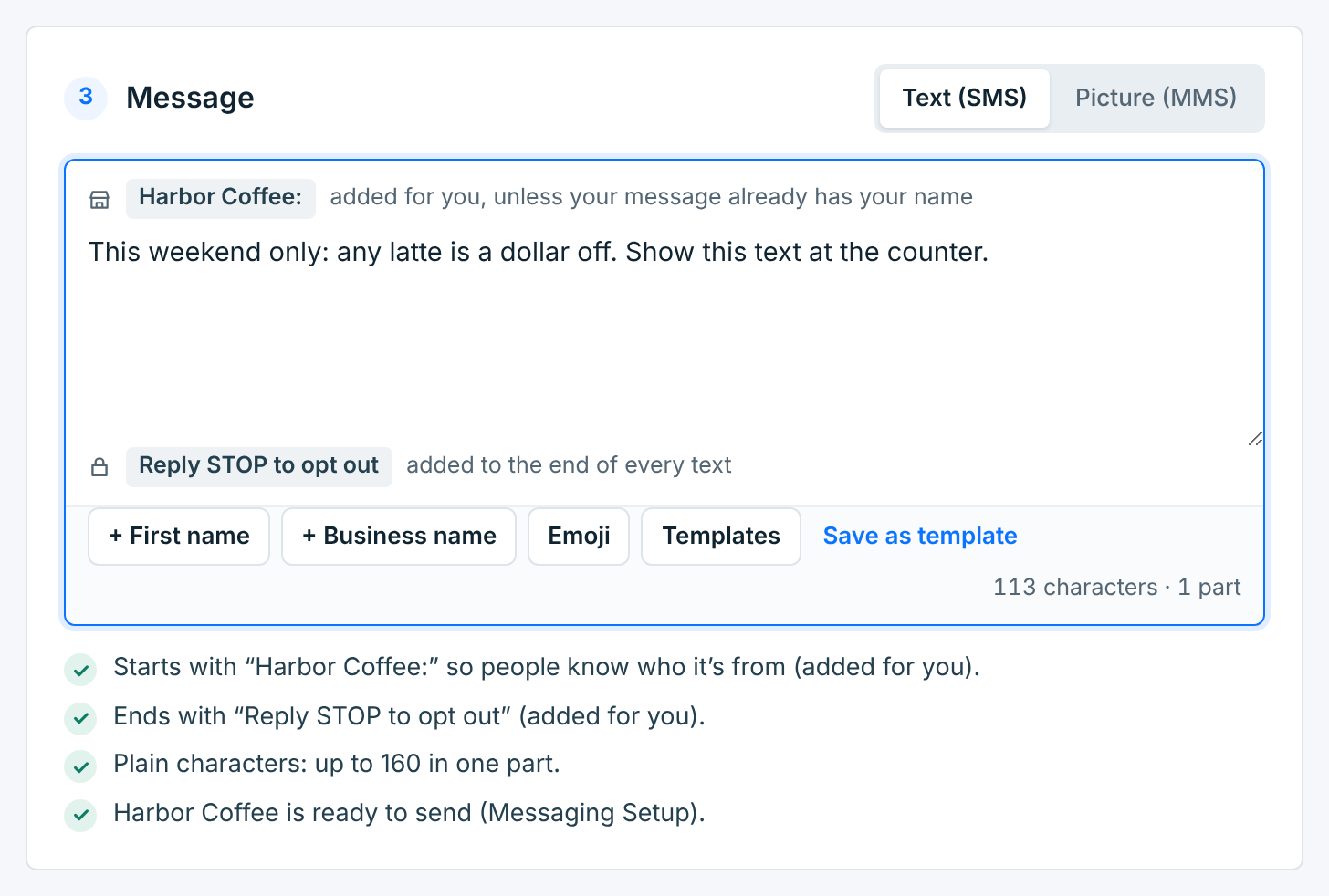
Every campaign text names your business: Harbor Coffee: goes in front when it’s sent, unless the text already has the name. Welcome texts carry it too. |
How to stop |
Reply STOP to opt out goes at the end of every campaign text, unless the text already says how to opt out. A text that’s too long once the name and that line are in isn’t sent without them: it isn’t sent at all. |
Stopping works |
A reply with STOP, UNSUBSCRIBE, OPT OUT and the like opts that person out of that business at once, even mid-send. Nobody can add them back; only they can come back, by texting START. See Opt-outs, STOP and START. |
HELP |
Once you’ve set up your HELP reply in Messaging Setup (on Twilio, you paste it into Twilio once), anyone who texts HELP gets your business name and how to reach you. See Replies, STOP and HELP. |
Daytime only |
Campaigns reach people only between 8 AM and 8 PM, on their own clock and, for a business in the US or Canada, on your business’s too. Texas numbers wait until 9 AM, and until noon on Sunday. See When texts go out. |
Not too often |
A campaign skips anyone who got another campaign from the same business in the 24 hours before it goes out. It’s on to start with. |
A registered number |
Campaigns go out only from a number that’s ready to send. A toll-free number has to be verified by the carriers first, and we file that for you. See How toll-free approval works. |
The proof |
Every opt-in, opt-out and START is written down and kept for at least 4 years, even after you delete a business or your account. See Your consent record. |
You see the name and the STOP line on every message you write, as grey parts you can’t edit:
What’s up to you#
- Only text people who agreed. They have to have agreed to get marketing texts from that business. A list you bought, or customers who never signed up for texts, doesn’t count. See What counts as opt-in.
- Send what you said you would. Your webform tells people what they’re signing up for and about how often you’ll text, like About 4 texts a month. Keep to it. Your number’s registration also describes the texts you send, and carriers compare the two.
- Set up your HELP reply. Add a support contact in Messaging Setup, and on Twilio paste the reply into Twilio once. See Replies, STOP and HELP.
- Keep your links up. Your privacy policy and terms pages are linked from every sign-up page, and carriers open them.
- Mind what you sell. Carriers don’t allow some kinds of content on toll-free numbers at all, and products like alcohol or vaping need an age check when people sign up. We don’t scan your texts for this: your number’s registration asks about it, and a person at the carrier reviews it.
- Don’t ask for replies. We act only on STOP, START, HELP and your webform keywords. There’s no inbox, so other replies aren’t shown to you anywhere. The message checks warn you when a text asks people to reply.
- Honor opt-outs you hear about another way. If someone asks you in person, by email or on the phone to stop texting them, unsubscribe them on their contact page. See Unsubscribe someone yourself.
What isn’t covered for you#
A few things aren’t automatic, so you know where the edges are:
- Test texts go out at any hour, because they go only to the number you type, usually your own.
- HELP and keyword replies go out at once, whatever the time, because the person just texted you. We don’t reply to STOP ourselves.
- Welcome texts from your apps wait for daytime, unless you turn off Hold texts outside the window in Integrations.
- How often you text isn’t capped. AI Promo warns you when a plan would text more often than you told people. For other campaigns, keep count yourself.
- Your own 10DLC number: a local number is registered in your own Twilio or Vonage account. We don’t file those. When we can read its 10DLC campaign from your account, campaigns wait while it’s in review or rejected; otherwise, check it in your Twilio or Vonage account.
Complaints and carrier blocks land on your Twilio or Vonage account, because the number is yours. When a carrier asks for proof that someone agreed, it’s in Reports → Export → Consent proof. See Your proof.