Your plan and trial
Your free trial, what each plan allows, the Usage card, and what stops when a trial ends without a plan.
Your plan sets how many contacts, businesses and texts a month your account allows. Every account starts with a 30-day free trial. This guide covers the trial, the plans, the Usage card, and what happens when the trial ends without a plan. To move to another plan or cancel, see Change or cancel your plan.
The Account page#
Open Account in the sidebar, or from the menu under your initials at the top right. Its tabs are Plan & usage (this guide), Billing for your card and invoices (see Payments and invoices), Security for how you sign in (see Sign-in and security) and Preferences for your time zone (see Your time zone).
Your free trial#
The trial is 30 days and needs no card. Everything works while you try it, with Starter’s limits: 500 contacts, 2 businesses and 25,000 texts a month. The notice at the top of Plan & usage counts down the days left.
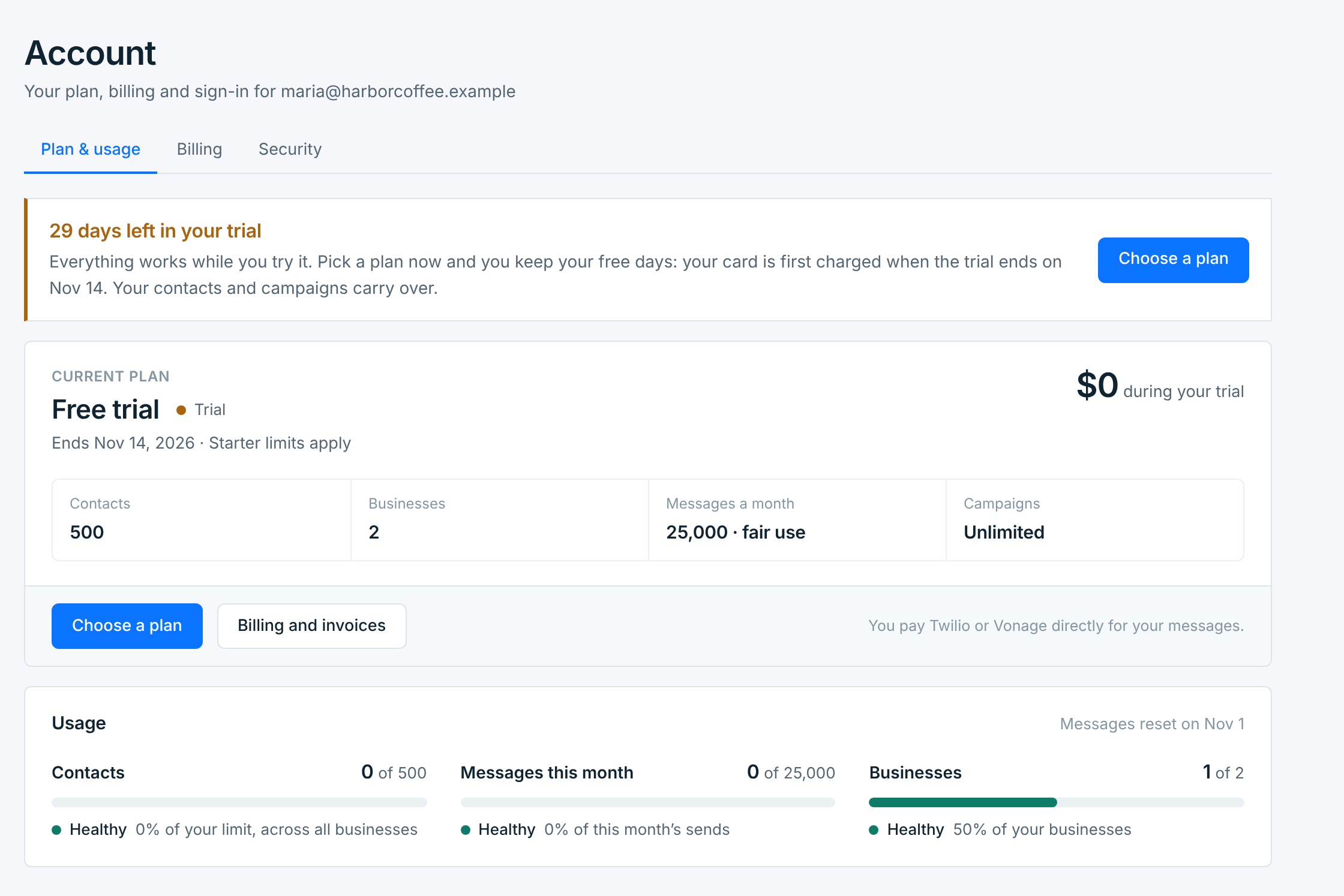
The Current plan card shows what you’re on, when it ends, what it costs and what it allows. Your plan doesn’t include the texts themselves: you pay Twilio or Vonage directly for those.
If you haven’t picked a plan, we email you 3 days before the trial ends, and again when it ends.
The plans#
Press Choose a plan to compare them. Prices are in US dollars and billed monthly.
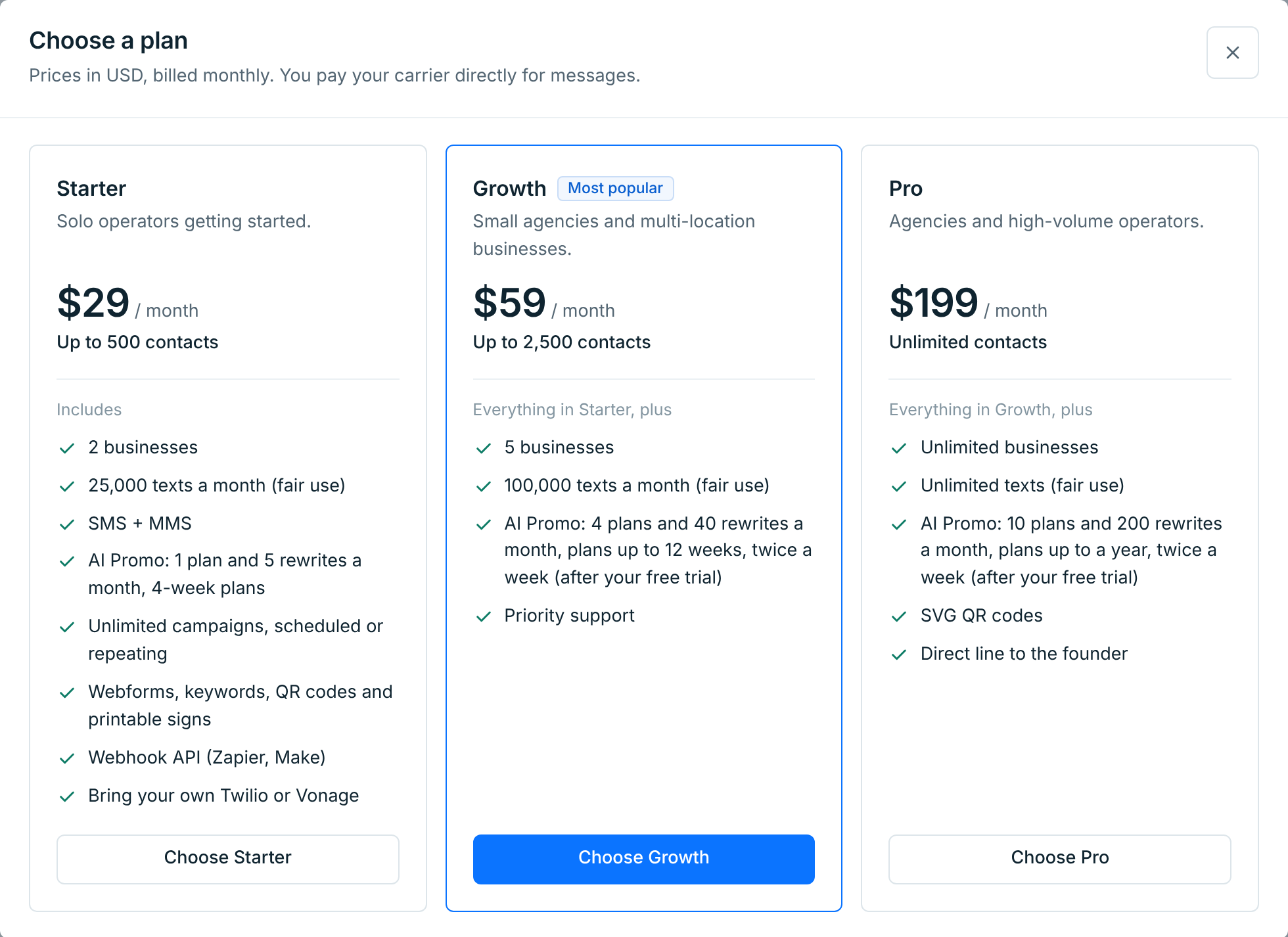
| Plan | Contacts | Businesses | Texts a month | AI Promo |
|---|---|---|---|---|
Starter $29 |
500 | 2 | 25,000 (fair use) | 1 plan and 5 rewrites a month, 4-week plans |
Growth $59 |
2,500 | 5 | 100,000 (fair use) | 4 plans and 40 rewrites a month, plans up to 12 weeks, twice a week |
Pro $199 |
Unlimited | Unlimited | Unlimited (fair use) | 10 plans and 200 rewrites a month, plans up to a year, twice a week |
Every plan has unlimited campaigns, scheduled or repeating, SMS and MMS, webforms, keywords, QR codes and printable signs, and the webhook API for Zapier and Make. Growth adds priority support. Pro adds SVG QR codes and a direct line to the founder.
Picking a plan during the trial#
Pick a plan before the trial ends and you keep your free days. Press Choose Growth (or the plan you want), then Continue to checkout, and add your card on Stripe’s secure checkout page. If you have a promotion code, enter it there. Nothing is charged that day.
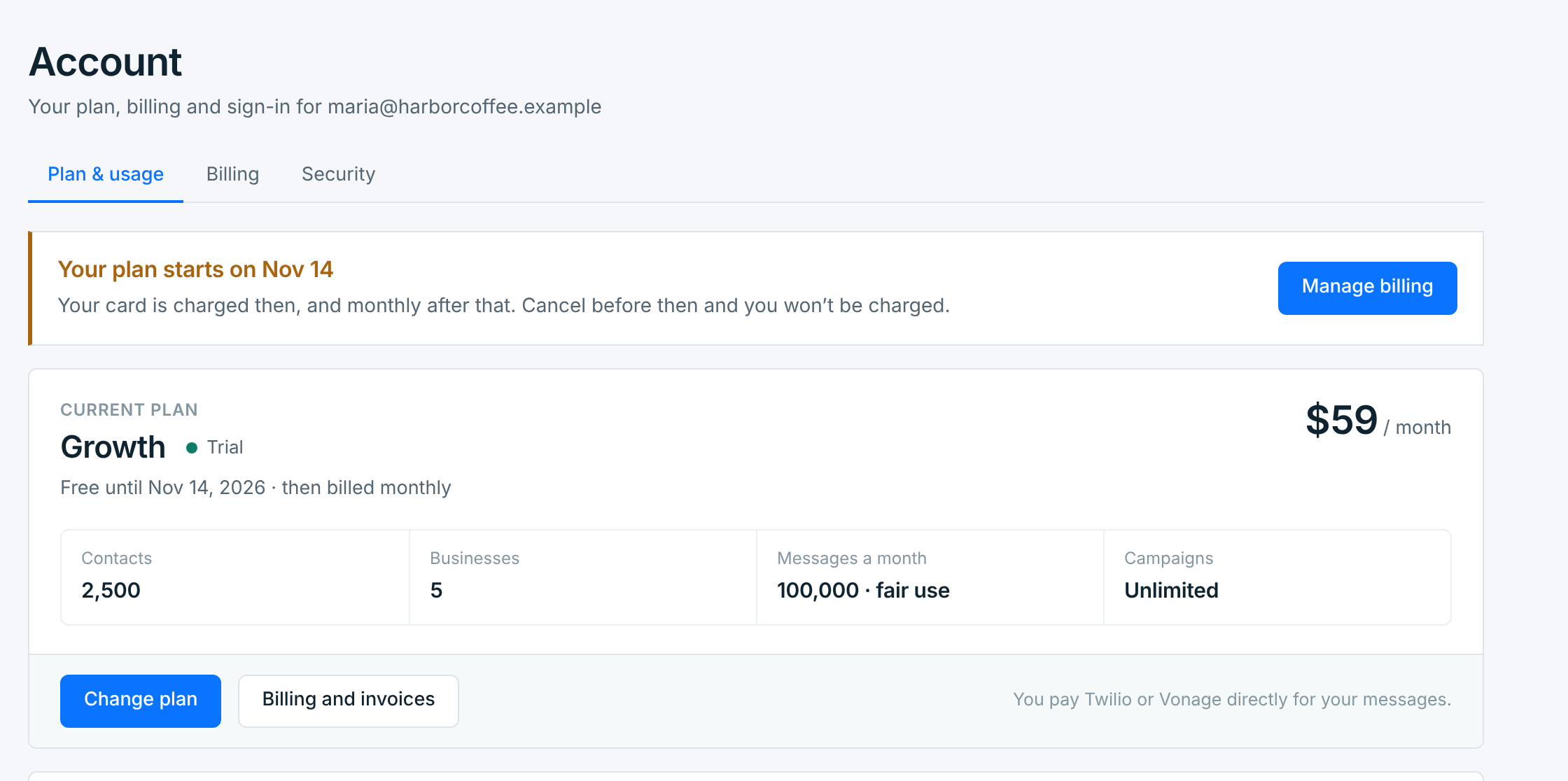
Back on Account, the notice says when your plan starts. That’s the day the trial ends: your card is first charged then, and on the same day each month after that. With less than 2 days of the trial left, the first charge is 2 days after you pick; the notice gives the date. The plan’s contact, business and text limits apply straight away. AI Promo keeps Starter’s allowance until the trial ends.
We email you to confirm. If the first charge is more than a week away, we remind you a week before it. Until then you can still change the plan, or cancel it and not be charged at all. See Change or cancel your plan.
Usage#
Under the plan card, Usage shows how much of your plan you’re using, across all your businesses.

| Meter | What it counts |
|---|---|
Contacts |
Subscribed contacts in all your businesses, paused businesses included. People who opted out don’t count. Getting close from 60%, Near limit from 90%, Full at 100%. |
Messages this month |
Texts sent this billing month. The date at the top right of the card says when the count starts again: your billing date each month once you’ve picked a plan, otherwise the 1st of the month. Getting close from 60%, Near allowance from 85%, Allowance used at 100%. |
Businesses |
Businesses that are on. A paused business doesn’t count. Getting close from 60%, Full when every one is in use. |
On Pro, contacts, businesses and texts read Unlimited. Once a trial or a plan has ended, Usage shows the counts only: limits come with the plan you choose.
When you reach a limit#
- Contacts. At your limit, no one new can be added: webform and keyword sign-ups, apps, imports and contacts you add yourself are turned away, and so is someone texting START to rejoin. Everyone already subscribed keeps getting your texts, and opt-outs work as always. Upgrade to make room. We email you when you reach it.
- Businesses. You can’t add or resume a business until one is free. See Business slots and plan limits.
- Texts. The monthly number is a fair-use allowance, not a cut-off: sending carries on past it. We email you once in the month you reach it.
When the trial ends without a plan#
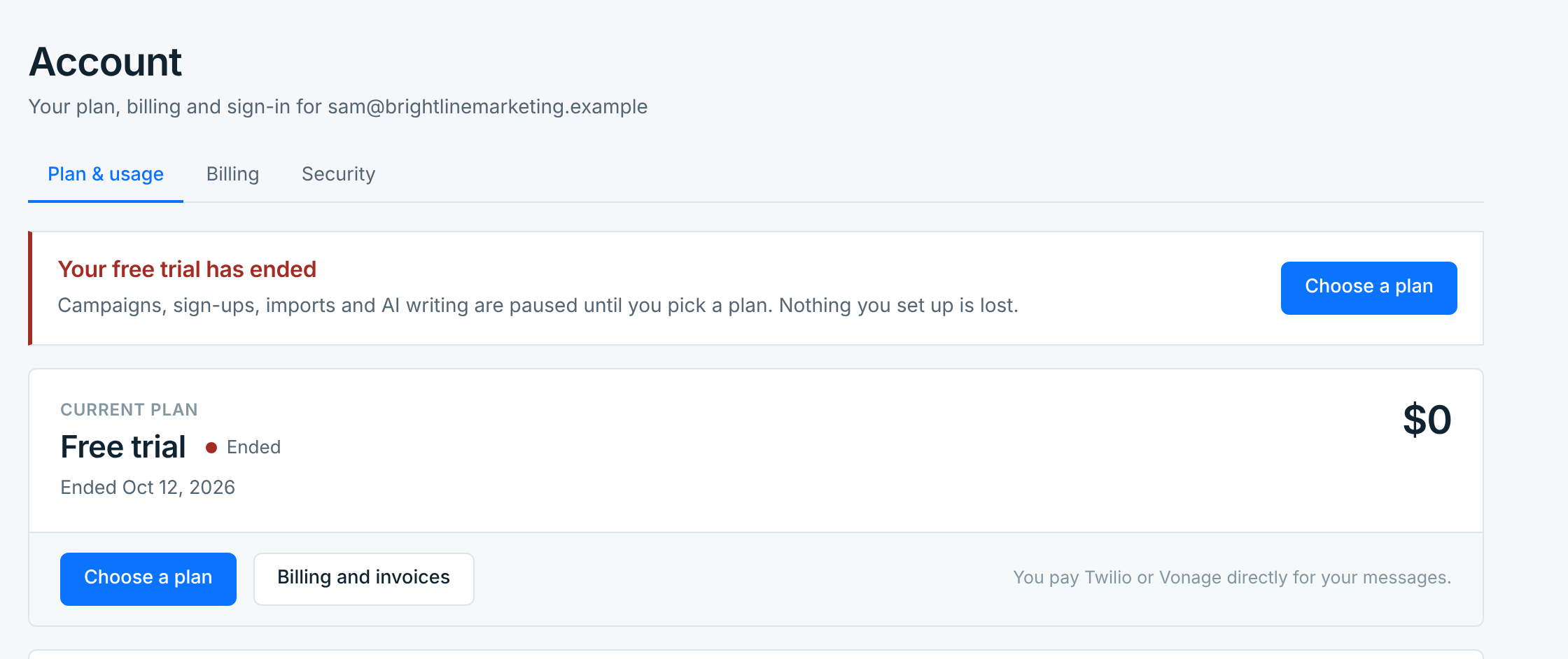
The account is locked until you choose a plan. Nothing you set up is deleted. A banner on every page says so, with Choose a plan.

On Account, the plan card says when the trial ended.
While the account is locked:
- No campaigns go out. A scheduled campaign whose time comes is blocked: it’s listed under Needs attention in Campaigns, and it won’t go out on its own. Once you have a plan, send it now or schedule it again; see When a campaign doesn’t go out. A repeating campaign skips its sends, and says so under Past sends, for example “Skipped Oct 16: account locked”. Its next send goes out as usual once you have a plan.
- No new sign-ups. Webforms show Paused · Account locked and take no sign-ups. Apps and imports can’t add contacts, though an app can still opt someone out. Someone who texts a webform’s keyword gets “Harbor Coffee isn’t taking signups by text right now.” with your business’s name, at most once a day, if the form’s Reply to people who text box is ticked.
- Welcome texts wait. A welcome text still waiting to go out is held. It goes out once you have a plan, if it has waited less than a day. After that it isn’t sent, and the Welcome text tab counts it under Account locked.
- No AI writing. AI Promos can’t write a new plan, rewrite a message, get a sample or read a menu. A plan that was being written waits. Choose a plan before its first week starts and it carries on; if the account is still locked then, it’s stopped and doesn’t use one of your AI plans. The drafting page gives the date. You can still edit your messages yourself.
- Most changes are locked. You can’t create, change or send campaigns, add contacts or webforms, change tags, templates or webforms, or add, resume or edit businesses.
What still works: you can see everything and download your contacts and reports. Anyone who texts STOP is still opted out, and so is anyone your app sends as opted out. You can cancel, stop or delete a campaign. You can also schedule an AI Promo message yourself: it goes out at its time only if you have a plan by then, and otherwise it’s blocked like any other campaign. You can pause or delete a business, change a webform’s keyword reply box, and delete your account.
Choose a plan and sending, sign-ups, imports and AI writing start again straight away. With the trial over, your card is charged that day, then monthly.
An account is locked the same way when a plan ends, or when a payment hasn’t gone through for 7 days. The banner says which. See Change or cancel your plan and Payments and invoices.