Your integrations
The Integrations screen: your webhooks and their status, Activity, a request's page, and why a contact is turned away.
Integrations is where contacts come in from your other apps: Zapier, Make, a form tool, your online store or your own website. Each business has its own webhook, and every request to it shows here with what happened, so you can tell at a glance that contacts are arriving and fix the ones that aren’t.
This guide covers the Integrations screen. To set up a webhook, see Your webhook, then the guide for your tool: Zapier, Make, or forms, Facebook Lead Ads, Shopify and your own code.
All your businesses#
Open Integrations from the sidebar. With more than one business, it starts on All businesses:
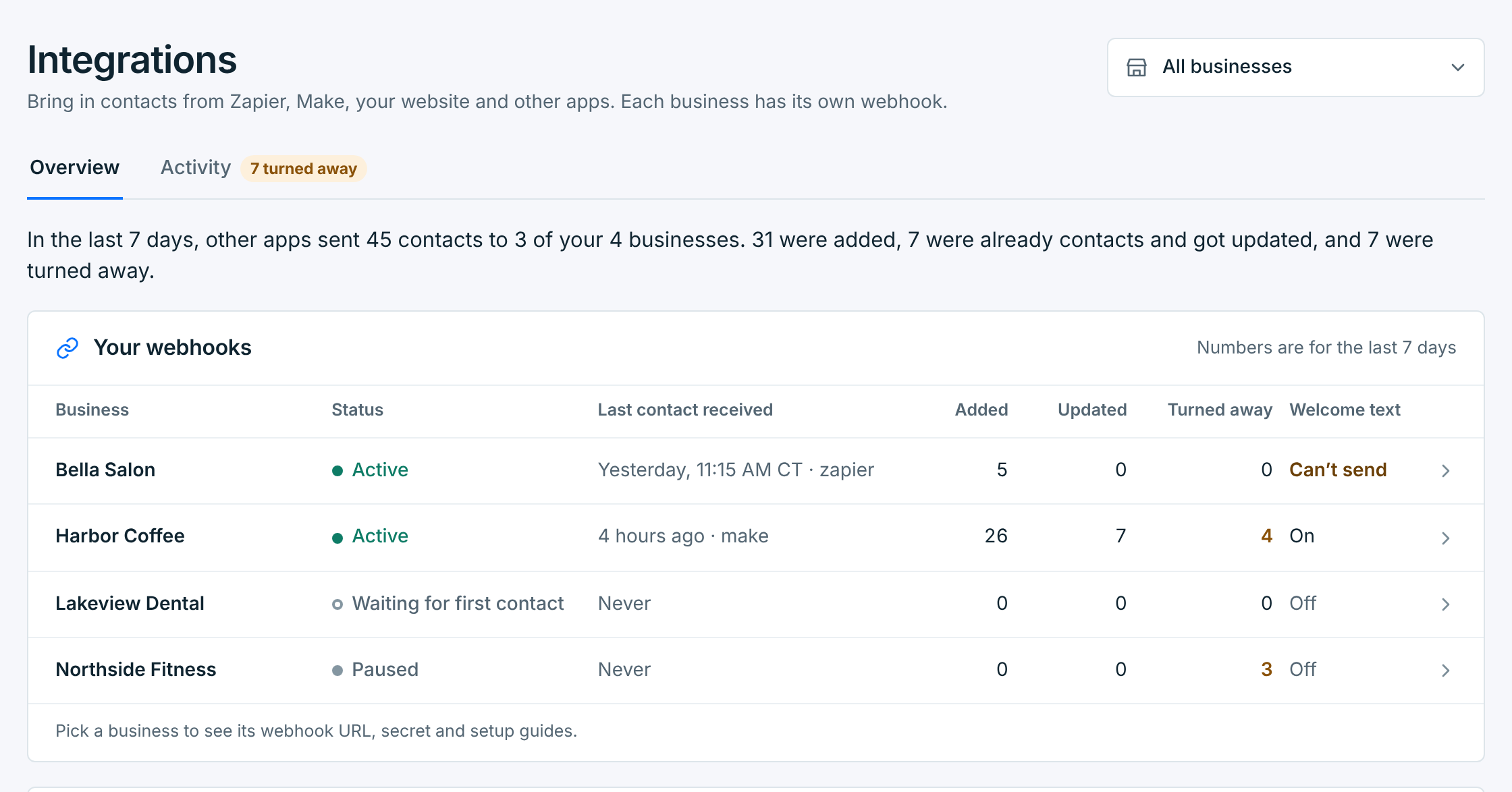
The line under the tabs sums up the last 7 days: how many contacts your apps sent, how many were added, how many were already contacts and got updated, and how many were turned away.
Your webhooks has a row for each business, 25 a page, with its numbers for the last 7 days. The line under the tabs covers every business, whatever the page. Click a row to open that business.
| Column | What it shows |
|---|---|
Status |
Where the webhook stands. See What each status means. |
Last contact received |
When the last contact was added or updated, and the app that sent it. Never until the first one. |
Added |
New contacts. |
Updated |
People who were already contacts. Their details and tags were brought up to date. |
Turned away |
Requests that didn’t add anyone. Amber when there are any. |
Welcome text |
On or Off. Can’t send means it’s on but the business can’t send texts right now, and Paused that the business is paused. See Welcome text. |
Latest requests lists the newest requests across your businesses. Click one to open it, or All activity for the full list.
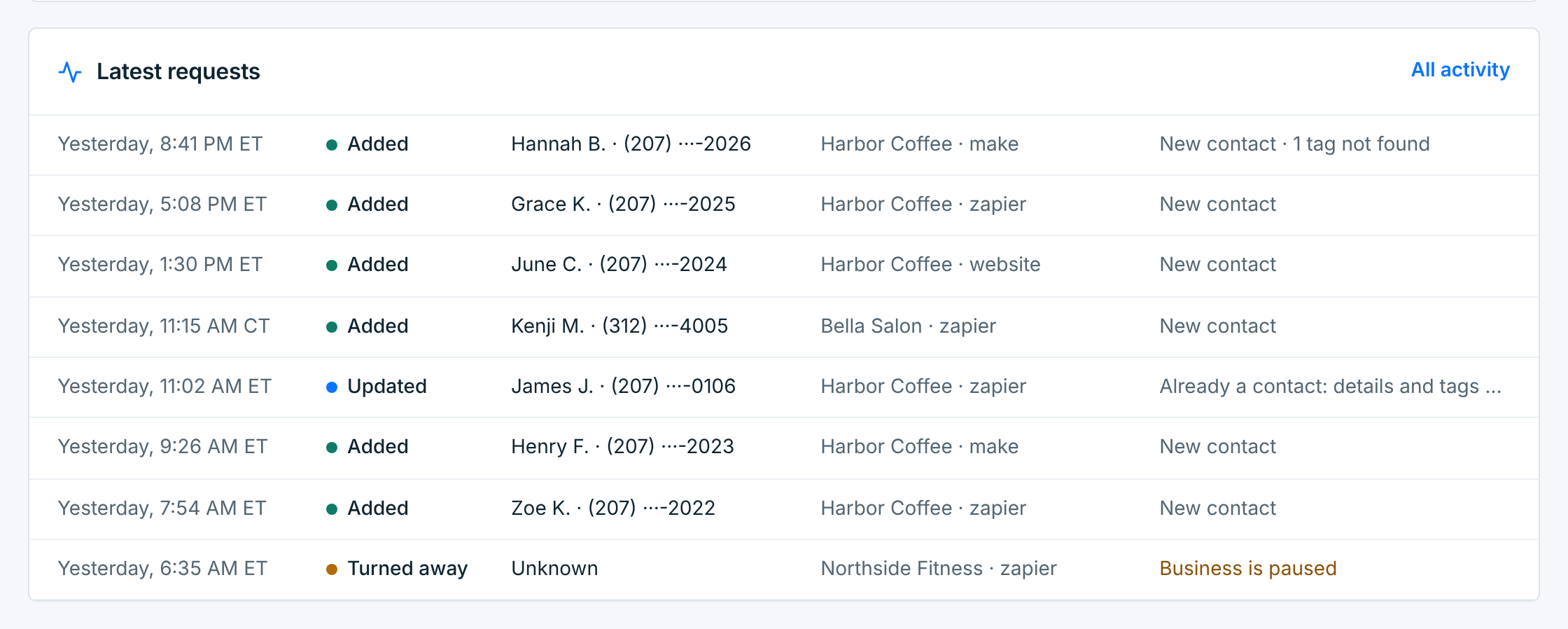
Times are in each business’s own time zone. When your businesses are in different time zones, each time says which one, like 11:15 AM CT.
What each status means#
| Status | What it means |
|---|---|
Waiting for first contact |
Nothing has been added through this webhook yet. Its Setup tab says so too, and updates on its own when the first contact arrives. |
Active |
Contacts are coming in. |
Needs attention |
Contacts are being turned away: the last 3 requests all had a missing or wrong secret, or more than a quarter of the last day’s requests weren’t added (5 requests or more). See When a webhook needs attention. |
Quiet for 30 days |
Nothing has come in for 30 days. Worth a look if the app should still be sending. |
Paused |
The business is paused, so its webhook turns contacts away until you resume it. Opt-outs still get through. Being deleted is the same for a business you’re deleting. |
One business#
Pick a business in the picker at the top, or click its row. A strip shows its status and its last 7 days, with three tabs under it:
| Tab | What’s in it |
|---|---|
Setup |
The webhook’s URL, business ID and secret, guides for each tool, the tags new contacts get, and a test. See Your webhook. |
Activity |
Every request, newest first. Its number counts the ones turned away in the last 7 days. |
Welcome text |
The text new contacts get. See Welcome text. |
Activity#
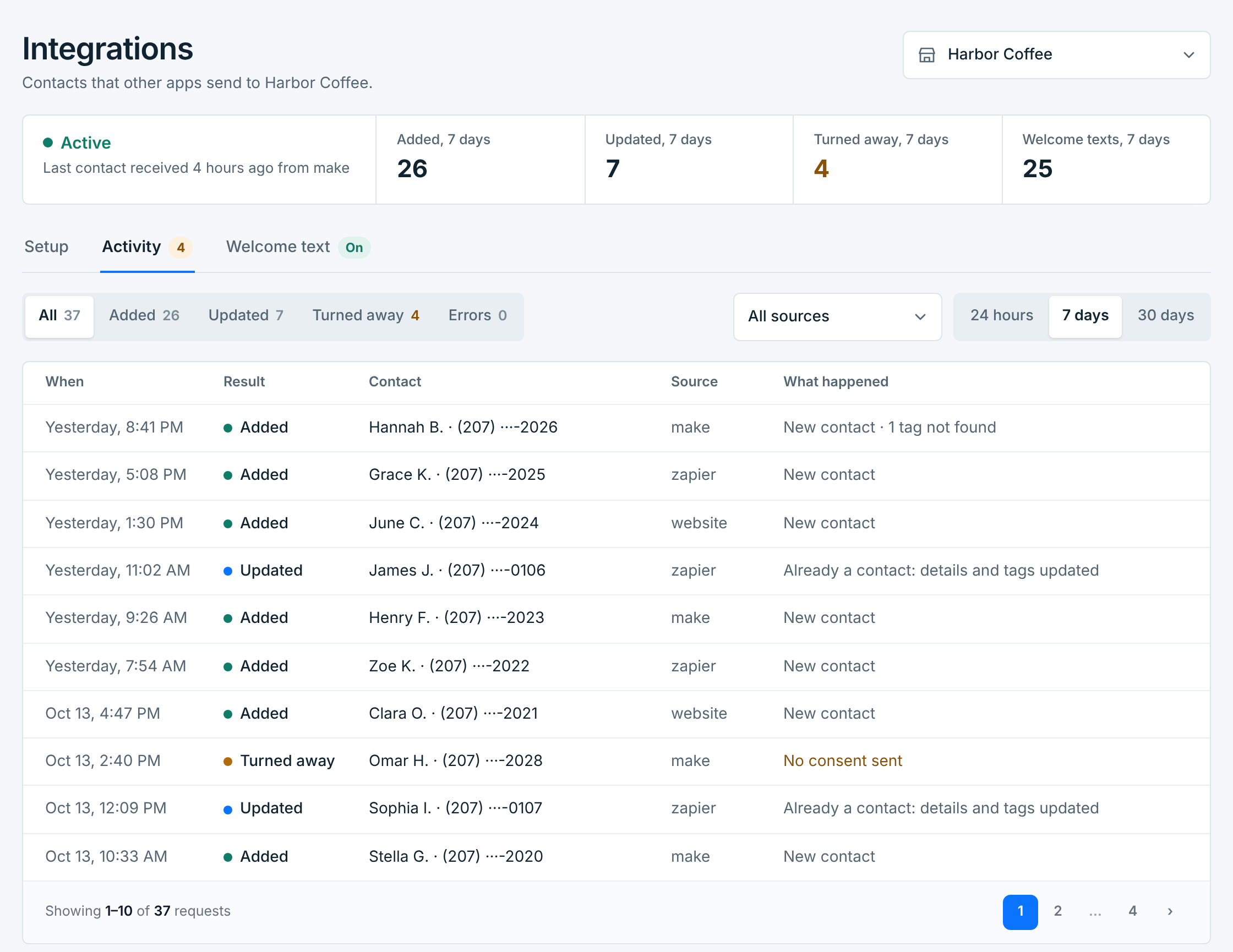
Each row is one request: when it came, what happened, who it was for, which app sent it, and in a few words why. Narrow the list with:
- All, Added, Updated, Turned away and Errors, each with its count.
- All sources: one app at a time, by the
sourceit sends. Give each app its own source, likezapierormake, and this tells them apart. - 24 hours, 7 days or 30 days.
While the page is open, it checks for new requests every few seconds. When some arrive, a line at the top says 1 new request came in, with Show it.
| Result | What it means |
|---|---|
Added |
A new contact, with the consent the app sent, or added as opted out when the app sent "status": "unsubscribed". |
Updated |
The number was already a contact, so their name, email and tags were brought up to date, or they were unsubscribed. A contact you’d deleted is added back. Nobody is added twice. |
No change |
Your app sent an opt-out for someone who had already opted out, so nothing changed: Already opted out: nothing changed. The webhook answers 200, so Zapier and Make don’t show it as failed. |
(opt-out only) |
After Added or Updated: your app opted someone out while the business was paused or being deleted, or your account was locked. Only the opt-out was saved, not the name, email or tags in the request. |
Turned away |
Nothing was saved. The app was told why, and so are you. |
Error |
Something failed on our side. We try again on our own, up to 4 more times over about 7 hours, and the app can safely send it again too. |
Test |
A test from Send a test contact or an app’s test step. Nothing was saved. |
A request’s page#
Click a row to open it beside the list:
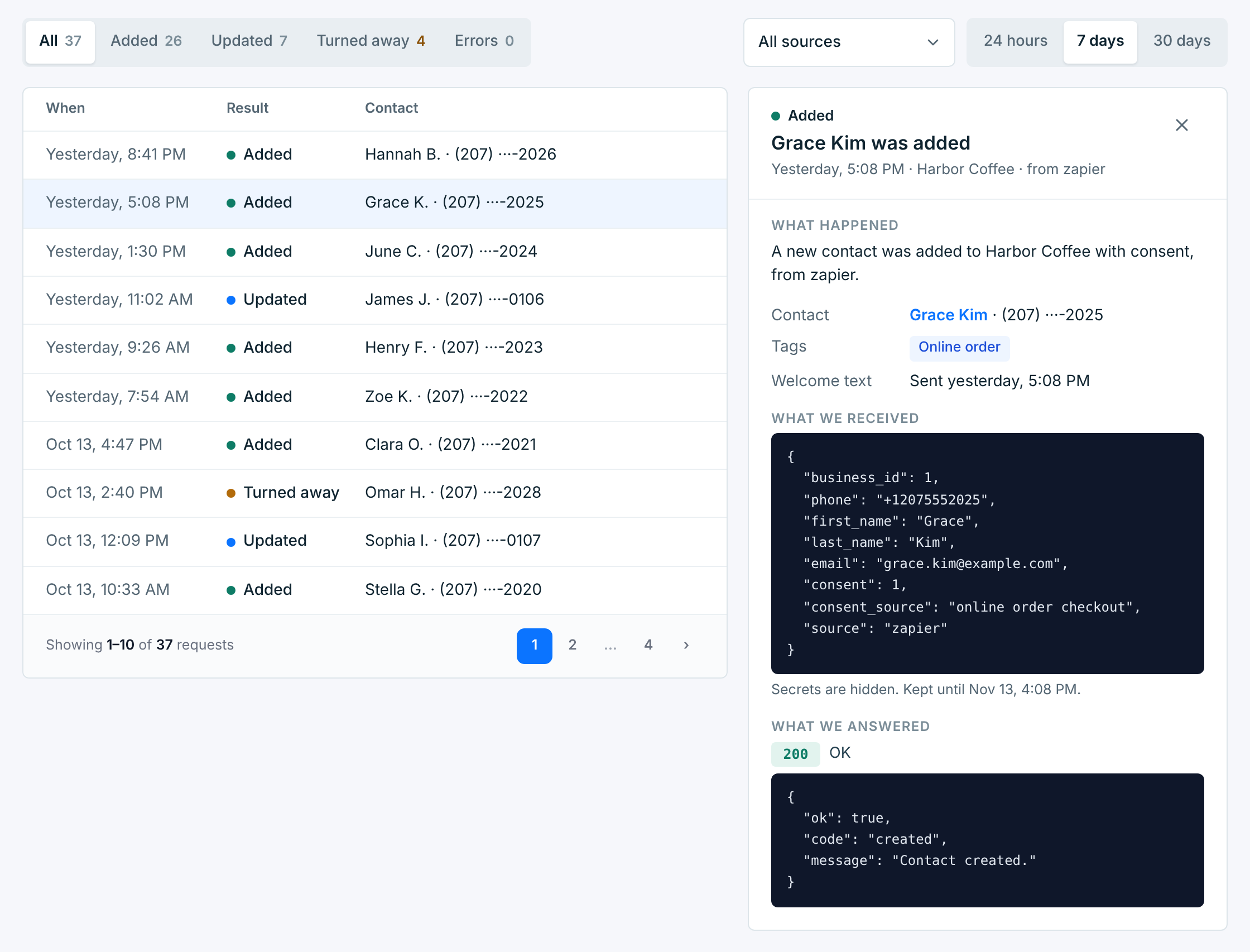
- What happened, in plain words.
- For a contact that was added or updated: the contact (click the name to open them in Contacts), the tags they have now, and their welcome text: sent, waiting for daytime, or why not.
- What we received: the request as your app sent it, with the secret hidden.
- What we answered: the status number and the reply your app got. Zapier and Make show the same reply in their own history.
When a request asked for a tag the business doesn’t have, its page says so, and its Activity row reads 1 tag not found:
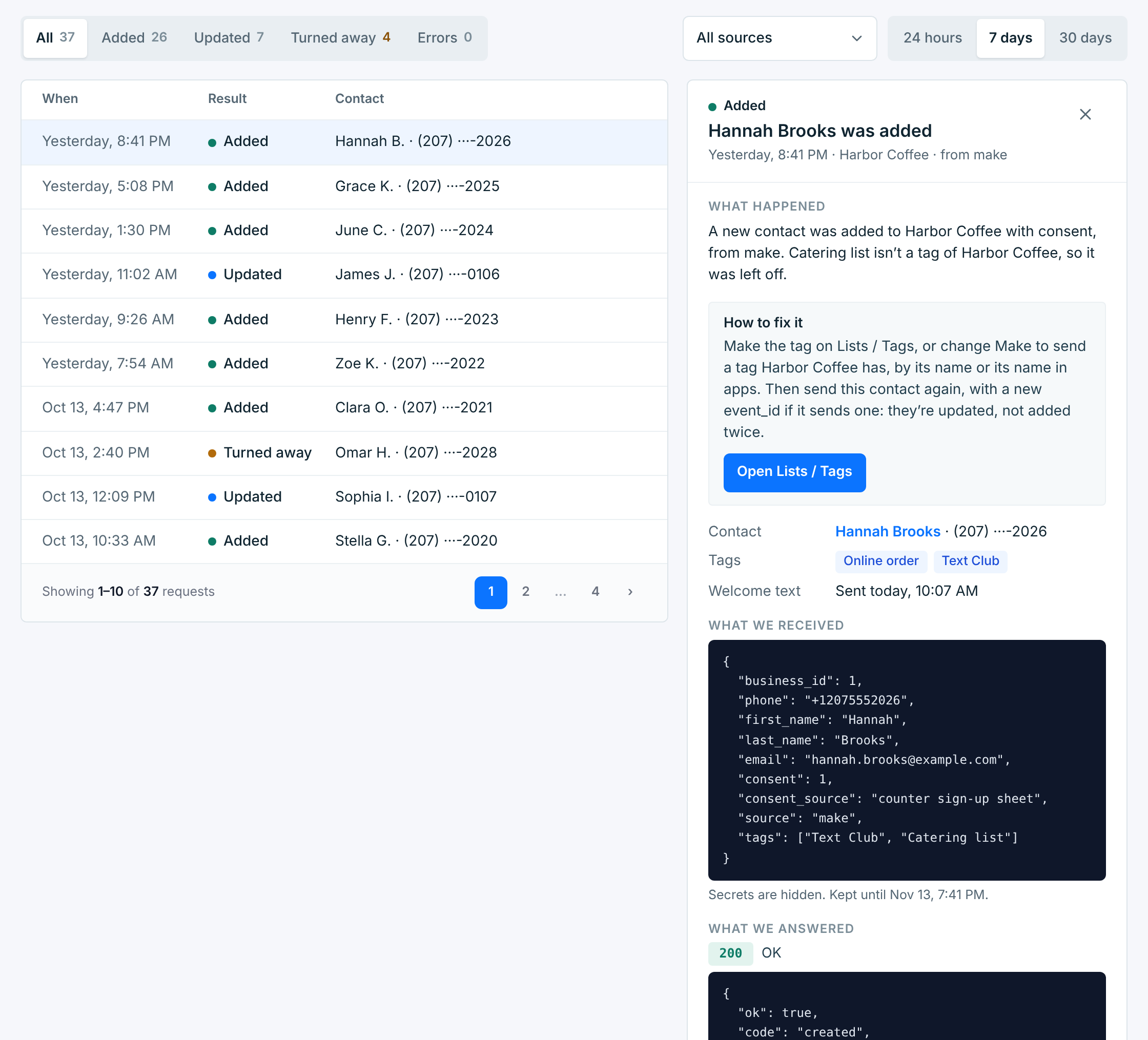
The contact is still added, without that tag. Make the tag on Lists / Tags, or change the app to send a tag the business has, by its name or its name in apps. Sending the same person again, with a new event_id if the app sends one, then updates them with it.
When a request’s event_id came before with another number, it’s still saved, as its own request, and its row reads event_id used before. The app is sending the same event_id for different people: have it send a different one for every contact, like the form entry’s or order’s own ID, or leave it out. Otherwise, when the same person is sent again with new details or tags, it’s taken for a repeat and ignored.
Why a contact is turned away#
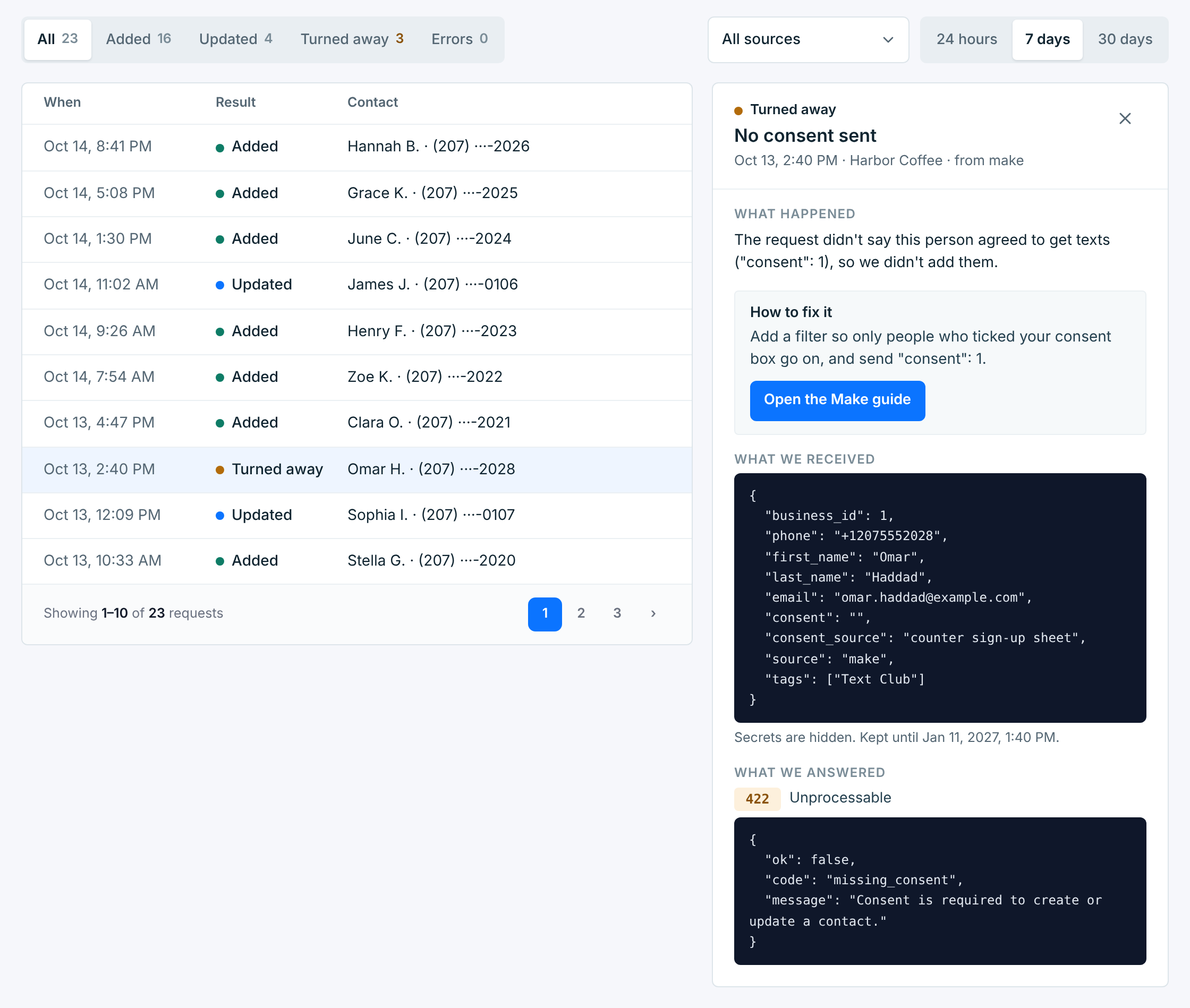
A turned-away request’s page says why, and How to fix it says what to change, with a button to the right place:
| Reason | What to do |
|---|---|
No consent sent |
The request didn’t say the person agreed to texts. Send "consent": 1, and only for people who ticked your consent box. |
Phone number not valid |
Send the full mobile number with its country code, like +12075550123. US and Canadian numbers also work without the +1. |
Opted out earlier |
Nothing to fix. People who opted out aren’t added back by an app. |
Wrong secret or No secret sent |
Paste the current secret into the app. After a rotation, every app needs the new one. |
Business is paused |
Resume the business on Businesses to take contacts again. Opt-outs still get through while it’s paused. |
Business is being deleted |
Only opt-outs come in while it’s being deleted. Turn off what sends contacts to it. |
Contact limit reached |
Your plan’s contact limit is full. Upgrade to keep adding contacts. |
Business ID missing or wrong |
Send this business’s ID as business_id with every request. |
Too many requests |
More than 120 requests in 5 minutes for one business from one address. Slow the app down, then send them again. |
A few rarer ones (a request over 64 KB, an inactive account, a test flag in the URL) have their own words on the request’s page. What the webhook answers lists every one.
When a webhook needs attention#
A webhook that keeps turning contacts away gets an amber note at the top of its page and of All businesses:

It says how many were turned away since when, and the most common reason. After a secret rotation, it says the app is still sending the old secret, with Copy the current secret. On All businesses, Fix it opens the request behind it.
The note goes away on its own once contacts are coming in again. Its × hides it until something new goes wrong.
A paused business#
A paused business is listed as Paused, with · paused in the picker. Its webhook turns contacts away until you resume it, though opt-outs still get through, and its page says so:
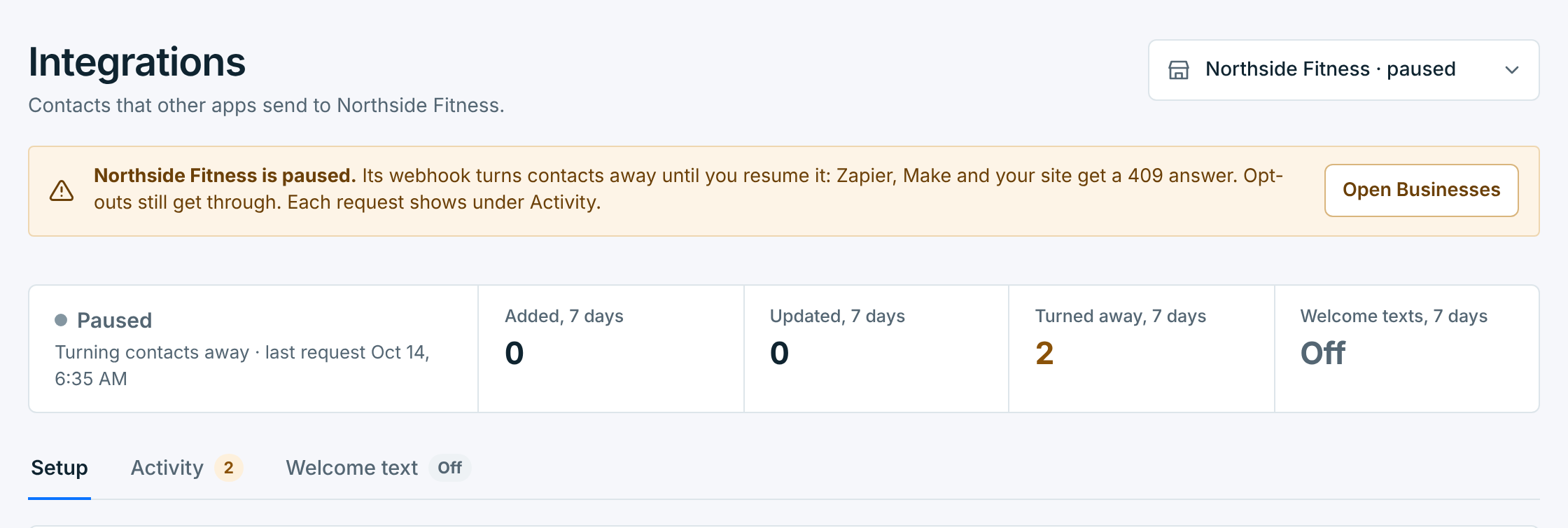
Each turned-away request still shows under Activity, so you can see which apps are still sending. Your apps get a 409 answer. Resume the business on Businesses, or turn off the apps that send to it.
How long it’s kept#
The Activity list keeps each request for 180 days. The request itself, under What we received, is kept for 30 days, 60 if it failed on our side, and 90 if it was turned away. A request with a wrong secret is never stored.