Your AI promos
The AI Promos screen: all your businesses, what the AI can do each month, one business's page and a message's status.
AI Promos drafts a calendar of promotional texts for a business, one or two a week, in the business’s voice and around its own offers and the holidays in those weeks. You read every message, change what you like, and schedule the ones you want. Nothing goes out until you schedule it, and you can unschedule any message until it sends.
This guide covers the AI Promos screen. To make a plan, see Make a plan with AI. To go through its messages, see Review and schedule a plan.
All your businesses#
Open AI Promos from the sidebar. With more than one business, it starts on All businesses:
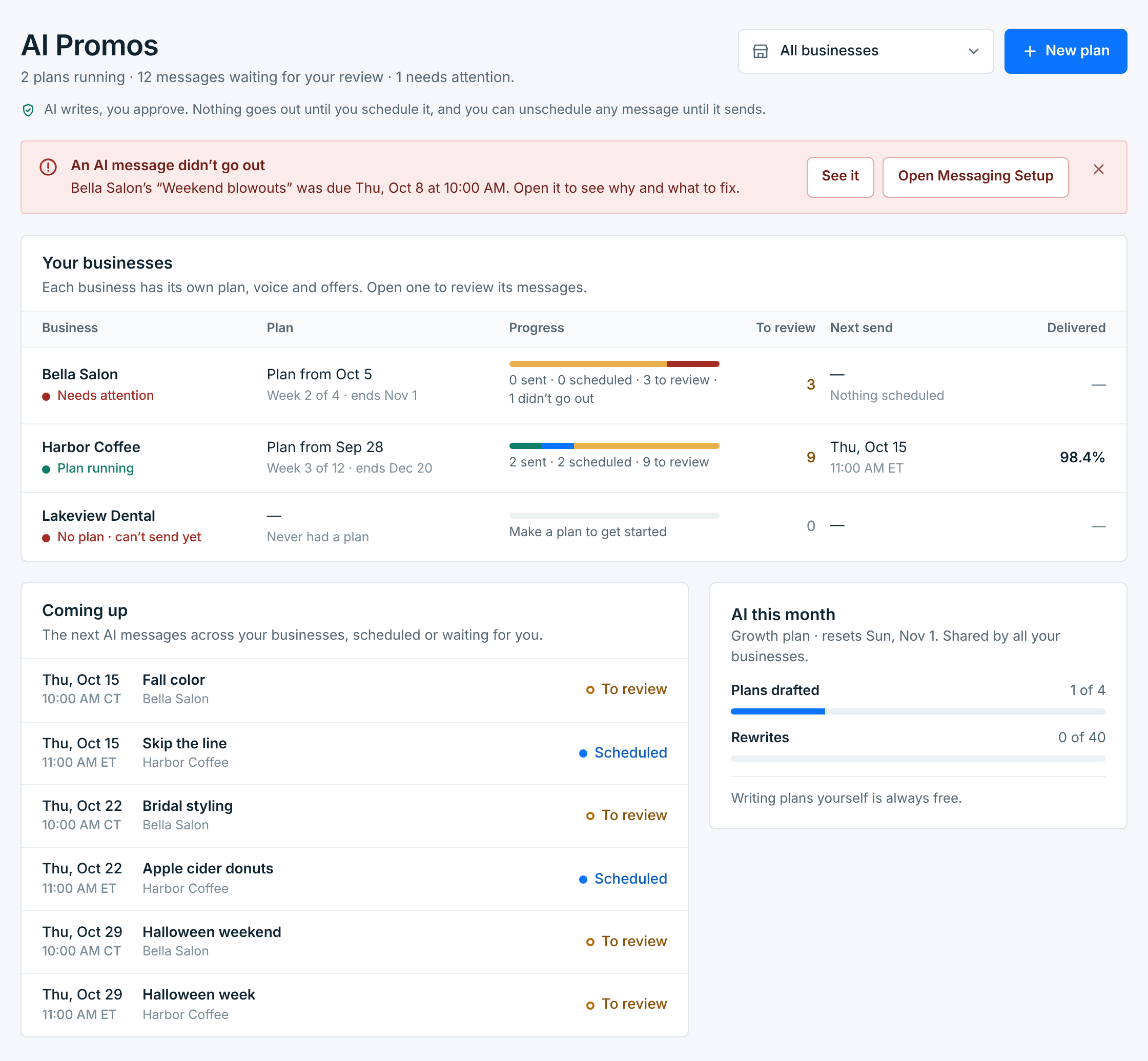
The line under the title counts the plans running, the messages waiting for your review, and any that need attention. When an AI message didn’t go out, a red note says which one, with See it to open it.
Your businesses has a row for each business, 25 a page. The line under the title and the red note cover every business, whatever the page. Click a row to open its plan.
| Column | What it shows |
|---|---|
Business |
Its name and where it stands: Plan running, Needs attention (a message didn’t go out), Can’t send right now, No plan, or Drafting a plan while the AI writes one. |
Plan |
The plan’s name, and where it is: the week it’s in, how many days until it starts, or the day it ended. |
Progress |
Its messages by status: sent (green), scheduled (blue), waiting for review (amber) and didn’t go out (red). |
To review |
Messages nobody has scheduled yet. |
Next send |
When its next scheduled message goes out, in the business’s time zone. |
Delivered |
The share of its plan’s texts that reached a phone. |
Coming up lists the next six AI messages across your businesses, scheduled or still waiting for you. Click one to open it.
What the AI can do each month#
AI this month counts the plans the AI drafted and the messages it rewrote this month, out of what your plan includes. All your businesses share them, and they start again on the 1st. With no plan, it shows the counts only.
| Your plan | AI plans a month | Rewrites a month | Plan lengths | Texts a week |
|---|---|---|---|---|
Starter |
1 | 5 | 4 weeks | 1 |
Growth |
4 | 40 | 4 or 12 weeks | 1 or 2 |
Pro |
10 | 200 | 4, 12 or 52 weeks | 1 or 2 |
During your free trial, AI Promos has Starter’s allowance. Writing your own messages is always free, and so are the sample texts on the brand profile (20 a day for each business).
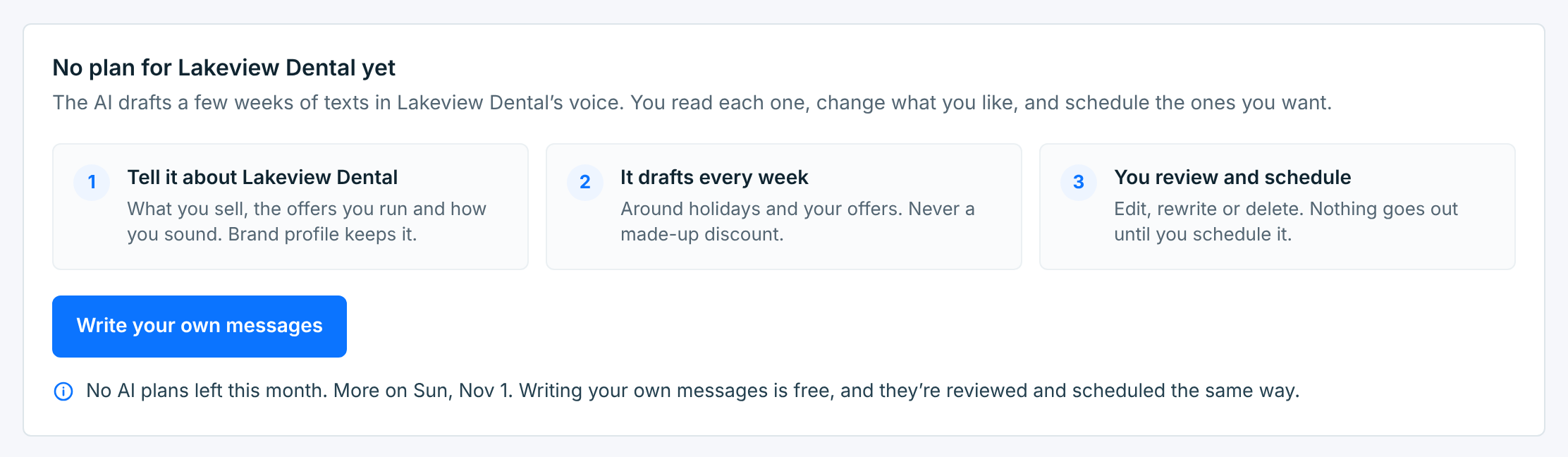
When the month’s AI plans are used up, a business with no plan offers Write your own messages instead, and says when more come:
One business#
Pick a business in the picker at the top, or click its row. Its page starts with its plan:
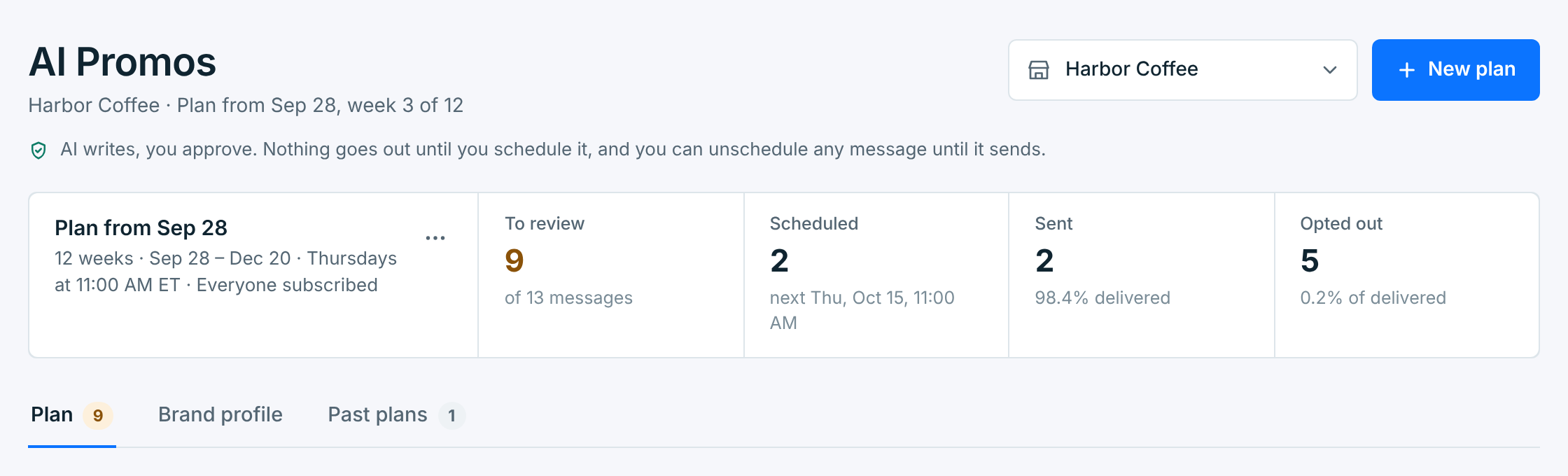
- The first box names the plan, its weeks, when it sends and who gets it. The … menu renames, lengthens, shortens or discards it. See Manage your plans.
- To review, Scheduled and Sent count its messages. The last box counts the people who opted out after one of them, or the messages that didn’t go out, when there are any.
Three tabs sit under it:
| Tab | What’s in it |
|---|---|
Plan |
The running plan, week by week. Its number counts the messages waiting for you. See Review and schedule a plan. |
Brand profile |
What the AI knows about the business: what it sells, its offers, how it sounds. Every plan and rewrite starts from it. |
Past plans |
Plans that ended or were replaced, with their results. |
A business has one plan running at a time. New plan drafts the next one, which takes over when it’s ready.
A message’s status#
| Status | What it means |
|---|---|
To review |
Drafted, by the AI or by you. It won’t go out until you schedule it. |
Scheduled |
It goes out at its day and time, as a campaign. You can unschedule it until it starts sending. |
Sending |
Going out now. |
Sent |
It went out. Its results are on it. |
Needs attention |
It was due but didn’t go out, usually because the business couldn’t send. It says why. |
Didn’t go out |
Its send was stopped in Campaigns, or it was skipped. It won’t go out. |
A business that can’t send, because its carrier connection or number isn’t ready, can still get a plan and have its messages edited. Scheduling waits until Messaging Setup says Ready. A red note on its page says why, with Open Messaging Setup.