What counts as opt-in
Who you can text, what doesn't count, how each way of joining is recorded, and getting the proof out.
Before you send anyone marketing texts, they have to have agreed to get them: from that business, at that number. The law calls it consent; carriers call it opt-in. Agreeing means the person did something, like ticking a box or texting your keyword. Being your customer isn’t enough. This guide covers what counts, what doesn’t, how each way of joining is recorded, and how to get the proof out when someone asks for it.
What counts#
Someone has opted in when they’ve clearly agreed to get marketing texts from your business, and you can show it. In TextScaleHQ that’s one of these:
- Your webform. They filled in your sign-up page, from its link, its QR code or your website, and ticked the consent box. See Create a webform.
- Your keyword. They texted your webform’s keyword, like COFFEE, to your number. See Keyword opt-in.
- Somewhere else, with proof you keep. They signed up another way you can show: a paper sign-up sheet, a tablet at the counter, a box on your own website or checkout. You then import them or add them, and confirm that they agreed. See Add and import contacts.
- Your apps. A form or shop sends them through Integrations, only for people who ticked a texting consent box there. See Forms, Facebook Lead Ads, Shopify and your own code.
Wherever it happens, what they agree to should say who’s texting, that the texts are marketing and automated, about how often, that agreeing isn’t a condition of buying anything, that message and data rates may apply, and how to get help and opt out. Your webform says all of that for you. On paper or a tablet, use the same words: copy them from your webform’s Consent.
What doesn’t count#
- A list you bought, rented or borrowed, whatever the seller says.
- Being a customer. Buying from you, booking, or giving you their number for a receipt or a delivery isn’t agreeing to marketing texts.
- Agreeing to something else: emails or phone calls (carriers want agreement to texts specifically), or texts from another business. That includes another of your own businesses: each one needs its own opt-in.
- A box ticked for them, or consent hidden in terms they had to accept.
- Numbers found online or on a business card.
- Making it a condition. You can’t make agreeing to texts a condition of buying anything. Offering a discount for joining is fine; refusing to sell to someone who won’t join isn’t.
Texting people who didn’t agree is against the law and against carrier rules. Complaints land on your Twilio or Vonage account, and the usual result is a blocked number.
How each way is recorded#
Every contact keeps how they joined and the proof that goes with it:
| How they joined | What they did | What’s kept |
|---|---|---|
Webform |
Ticked the consent box. It starts unticked, and the form won’t send without it. | The exact words beside the box, when, the page, the form, the first three parts of their IP address, their browser, and your privacy and terms links. |
Keyword |
Texted your webform’s keyword to your number. | The keyword, the number they texted from, and when. |
Import |
Nothing in TextScaleHQ: you ticked Everyone in this file agreed to get marketing texts, so the proof is yours to keep. | The file’s name, who confirmed it, and when. |
Added by you |
Nothing in TextScaleHQ: you picked how they agreed and ticked a box like it. | How they agreed (in person, your website, a QR code sign-up, another way), who confirmed it, and when. |
Integration |
Agreed in your app, which sent them with "consent": 1. |
When, which app, and the consent_source and opt_in_source your app sent, if any. |
Open a contact and the Consent tab shows it, with each opt-out and return after it:
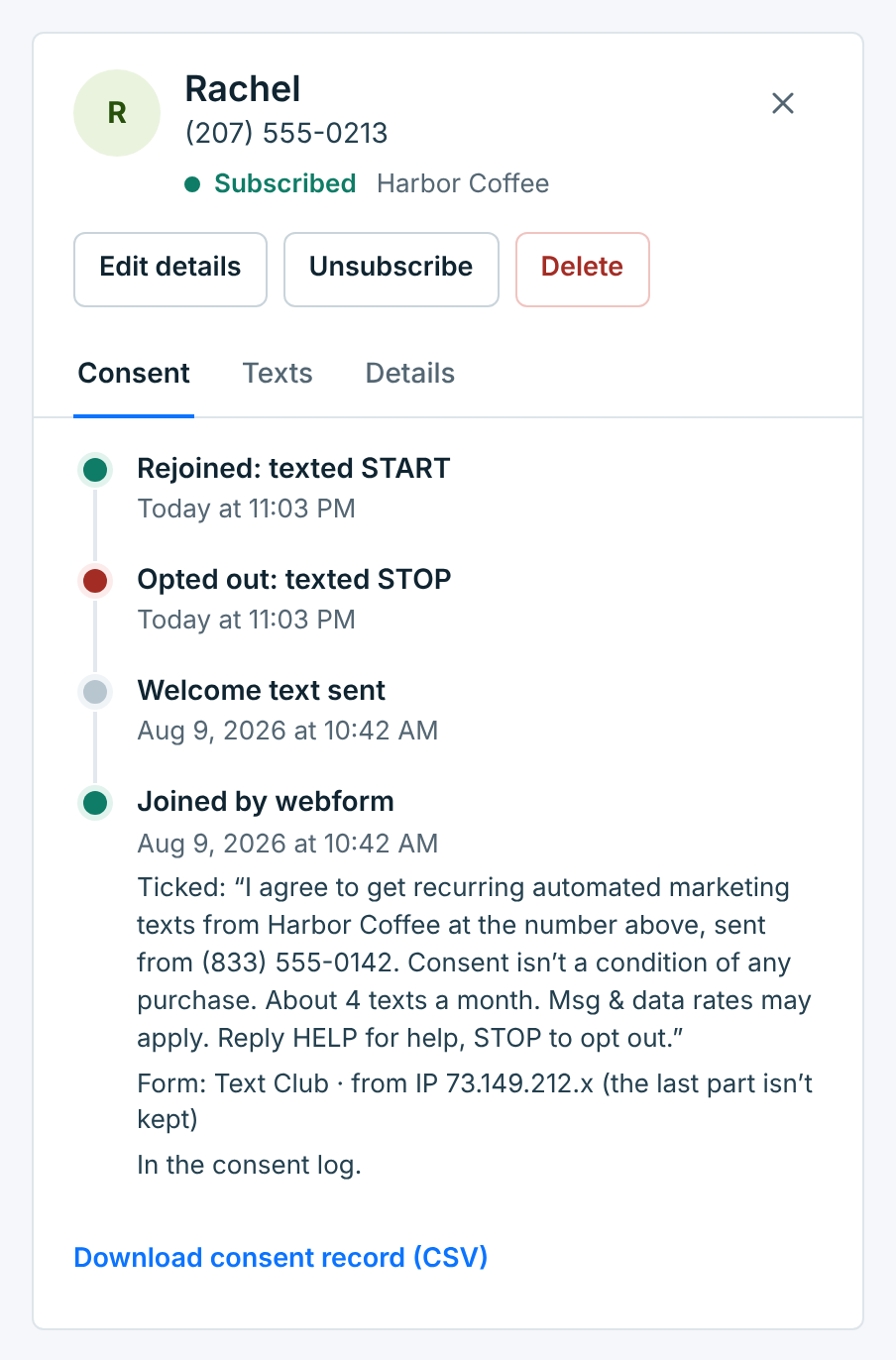
The webform’s consent words#
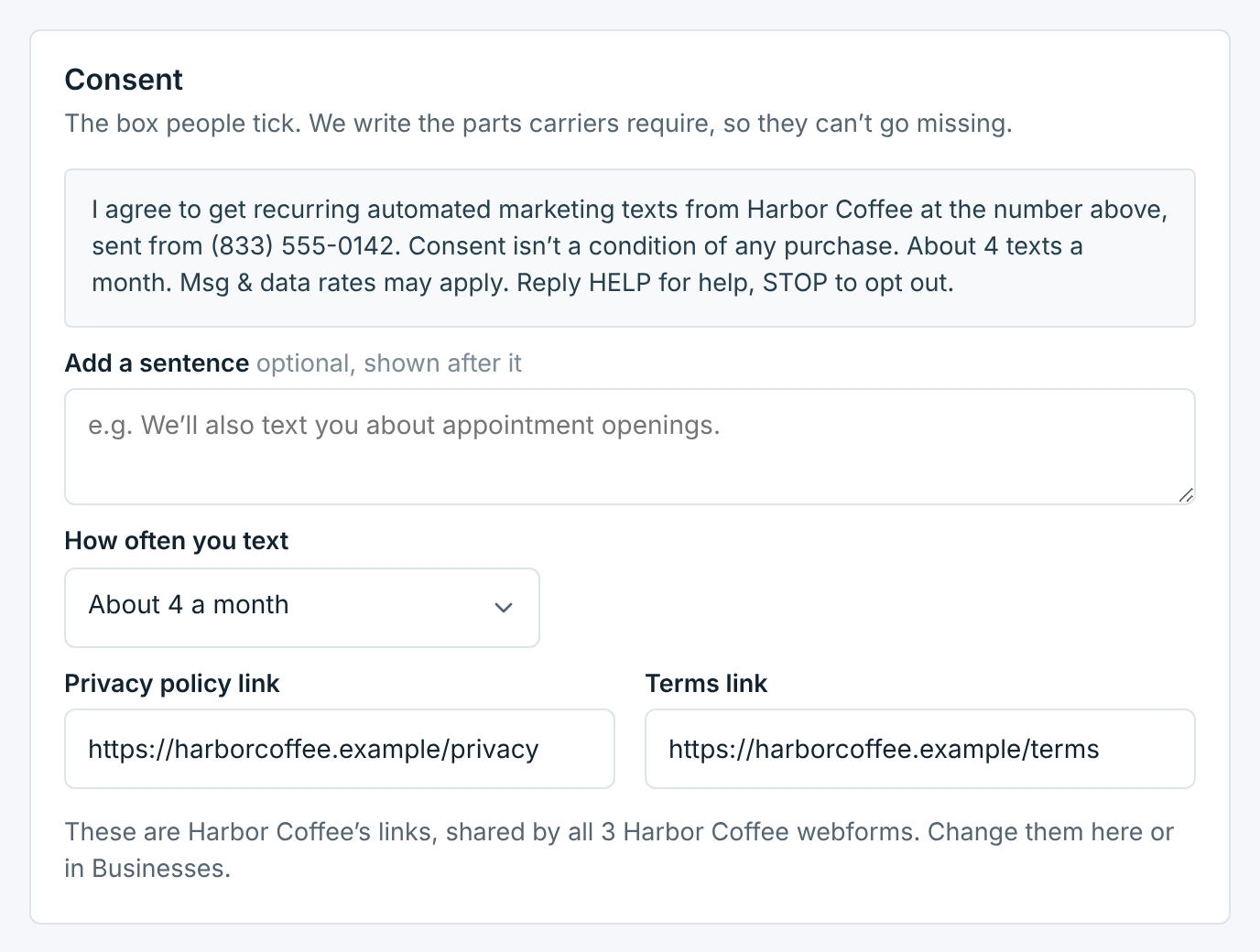
Your webform writes the words beside the box for you, so nothing carriers ask for can go missing:
I agree to get recurring automated marketing texts from Harbor Coffee at the number above, sent from (833) 555-0142. Consent isn’t a condition of any purchase. About 4 texts a month. Msg & data rates may apply. Reply HELP for help, STOP to opt out.
You choose how often you text, and you can add one sentence of your own. You can’t take anything out. The box starts unticked, and the form won’t take a sign-up without it. If the words change while someone has the page open, they’re asked to read them and tick the box again. Each contact keeps the exact words they agreed to, even if you change them later.
The welcome text#
Everyone who joins by webform or keyword gets a welcome text straight away. It must start with your business name and say HELP and STOP. The default also says about how often you text and that message and data rates may apply; keep those if you write your own. That text is their confirmation, and carriers check it. People you import or add yourself don’t get one. Contacts from your apps get one only if you turned it on in Integrations. See Welcome text.
Your proof#
When a carrier reviews your number, or someone says they never signed up, you need to show how they agreed. It’s in three places:
- One person: their Consent tab, and Download consent record (CSV) on it.
- Every change: Reports → Consent lists every opt-in, opt-out and START, with when and how. See Your consent record.
- Everyone’s proof in one file: Reports → Export → Consent proof. It has one row per contact, with how they joined and the proof above: the words they ticked, the page, the keyword, the file and who confirmed it. It covers everyone on file, whatever dates are picked.
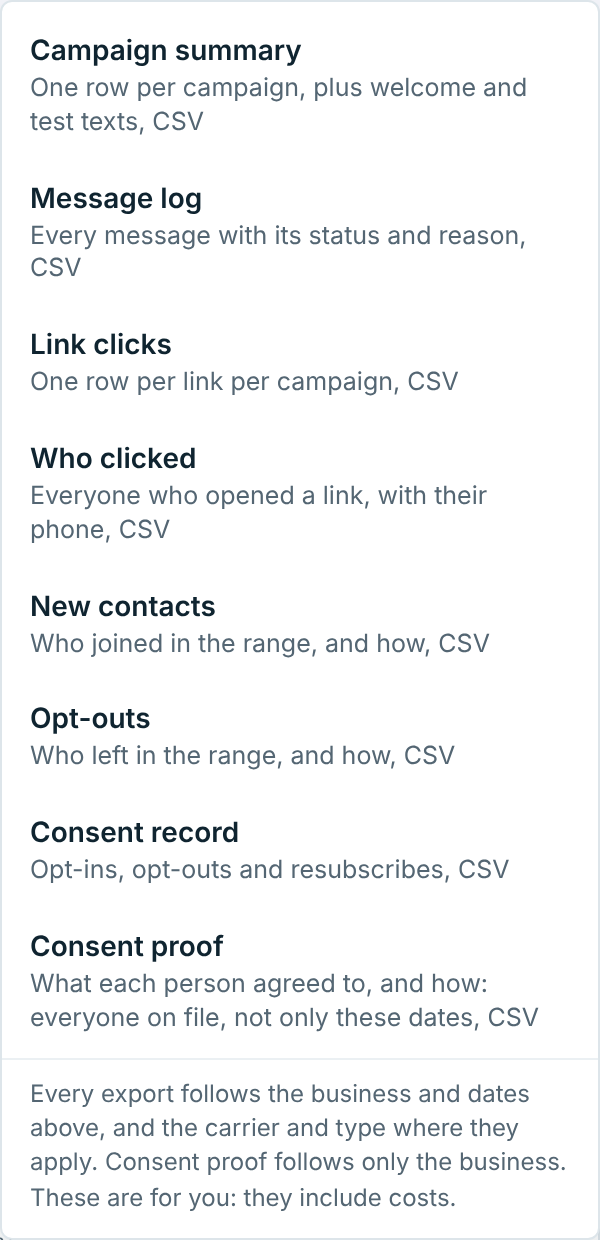
All of it is kept for at least 4 years, even after you delete a business or your account. After a delete, though, you can’t open it any more. So deleting offers Consent proof CSV and Consent record CSV to download first. Keep your own proof too: the paper sheets, your website form, what your keyword’s sign said.
Someone who’s already on your list and joins again, on another form or by texting your keyword, is told they’re already on the list. Their first opt-in stays the one on file.