Your campaigns
The Campaigns screen: the list, its statuses, the calendar and the recurring campaigns.
A campaign is one text sent to some or all of a business’s subscribers. This guide covers the Campaigns screen: the list, the calendar and the recurring campaigns, and what each status means.
To make one, see Send a campaign. To see how one went, see A campaign’s results.
The screen#
Open Campaigns from the sidebar.
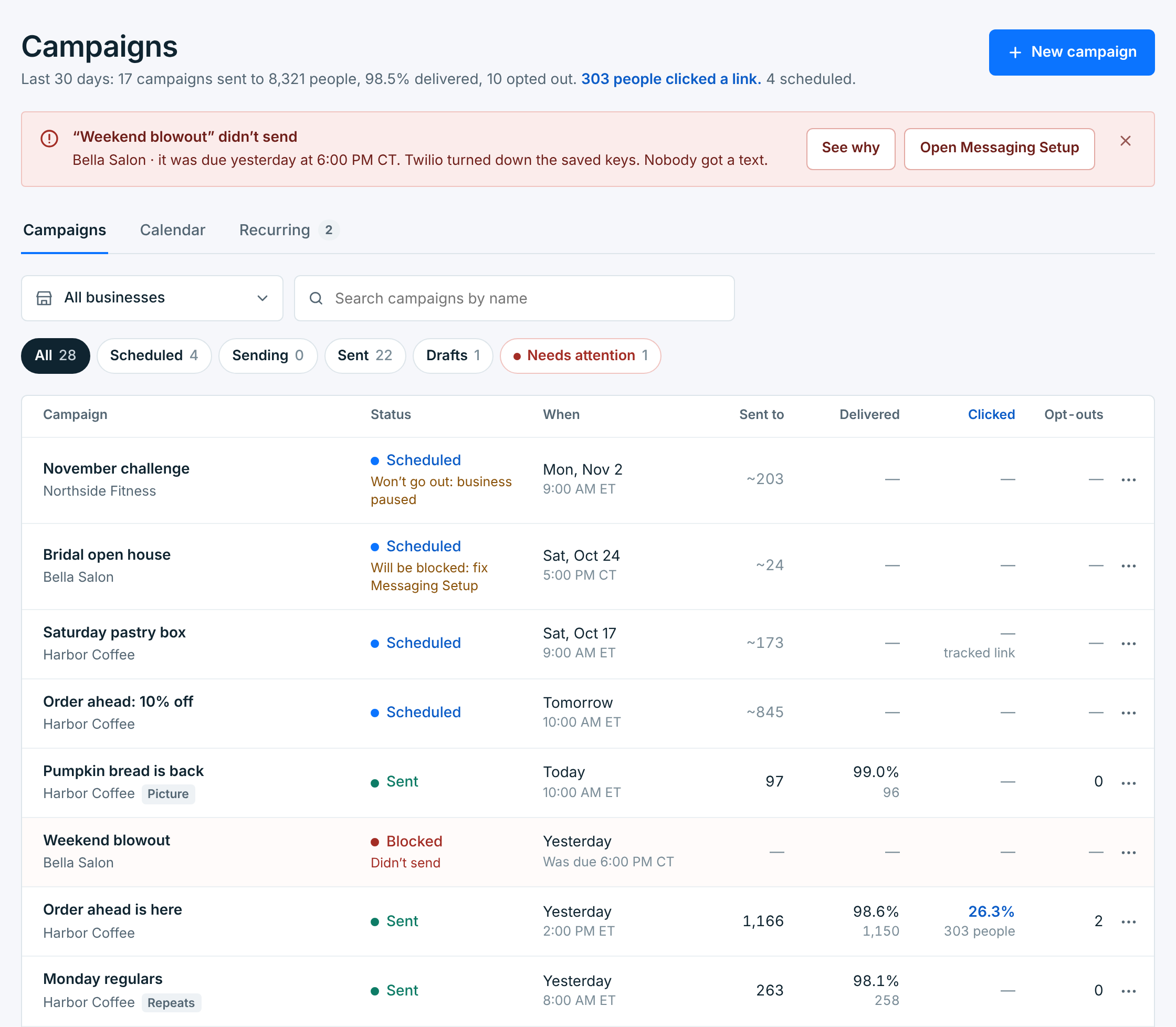
The line under the title sums up the last 30 days: how many campaigns went out, to how many people, how many were delivered, how many people opted out, how many clicked a link, and how many campaigns are scheduled. When a campaign didn’t go out in that time, a red note above the tabs names it and what stopped it, with a button to fix it. See When a campaign doesn’t go out.
Three tabs show your campaigns three ways: Campaigns is the list, Calendar puts them on the days they went out, and Recurring lists the ones that repeat. New campaign is at the top right.
A small clock under the title says whose time the times are in. With All businesses (when you have more than one), they’re yours: Times in your time: Eastern (ET). With one business picked, they’re the business’s: Times in Pacific Time (PT), with how far that is from your time when it’s different. Your time zone is set in Account › Preferences; see Your time zone.
The list#
Use the picker to show one business or all of them, and search to find a campaign by its name. The buttons above the list narrow it down:
| Button | Shows |
|---|---|
All |
Every campaign, by date, latest first, so the scheduled ones are at the top. |
Scheduled |
Campaigns waiting for their time. |
Sending |
Campaigns going out now. |
Sent |
Campaigns that went out, including ones you stopped part way. |
Drafts |
Campaigns you saved without sending or scheduling. |
Needs attention |
Campaigns that didn’t go out, or didn’t finish. It turns red when there are any. |
| Column | What it shows |
|---|---|
Campaign |
The name you gave it and its business. Picture marks a picture message, and Repeats marks one send of a recurring campaign. |
Status |
Where it is (below). A line under it says more, like 65 of 1,166 sent or Will be blocked: fix Messaging Setup. |
When |
When it went out or goes out: your time with All businesses, the business’s time with one business picked. When the two clocks are different, a line under it gives the other one: 7:00 AM at the business (PT), or 10:00 AM your time. A draft shows when you last edited it. |
Sent to |
How many people it went to. With a ~, how many it would go to if it went out now: the real number is counted when it goes out. |
Delivered |
The share of its texts that reached a phone, and how many that is. |
Clicked |
The share of people who clicked a link in it. Only for campaigns with a link. See Links in your texts. |
Opt-outs |
People who replied STOP to it. |
Click a row to open the campaign. The … at the end of a row has what you can do with it:
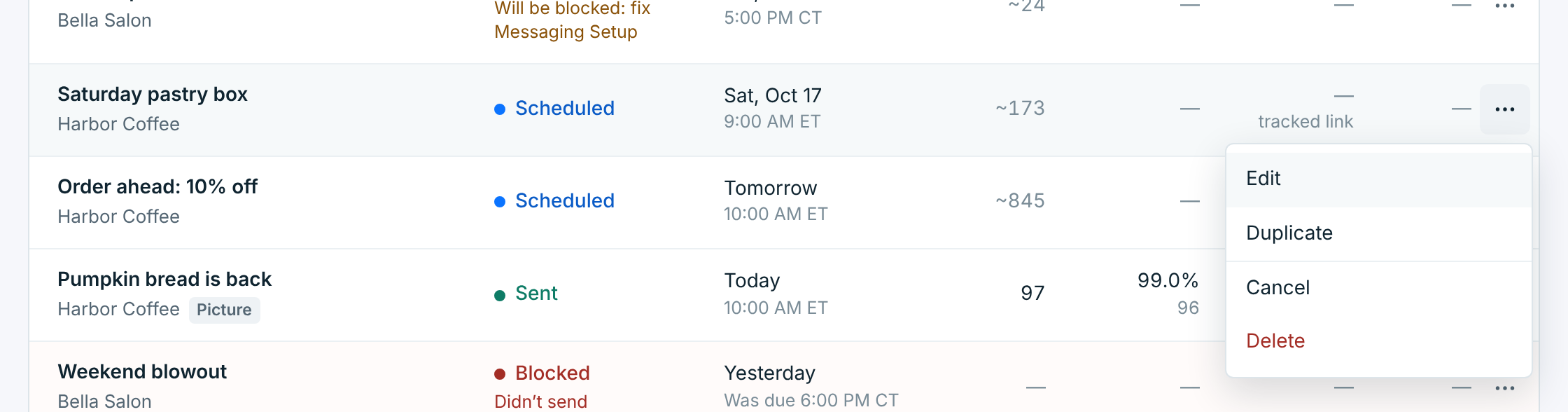
A scheduled campaign can be edited, duplicated, canceled or deleted. A sent one can be duplicated, its recipients downloaded, or deleted. A sending one has Stop sending.
What the statuses mean#
| Status | What it means |
|---|---|
Scheduled |
Waiting for its time. You can still change or cancel it. See Schedule a campaign. |
Sending |
Going out now, a few texts a second. You can stop the rest. |
Sent |
Every text went to your carrier. Whether each one reached the phone is the Delivered column. |
Stopped |
You stopped it while it was sending. The people it reached before then got it; nobody else will. |
Draft |
Saved, not sent and not scheduled. |
Blocked |
It was due, but something stopped it before a single text went out, usually your carrier connection. Nobody got it. |
Failed |
It didn’t go out (the line under it says Didn’t send), or it started and stopped part way on its own (Didn’t finish). Nobody else gets it. |
A paused business’s campaigns stay on the list, marked with its name. Its scheduled ones say Won’t go out: business paused. See When a campaign doesn’t go out.
The calendar#
Calendar puts each campaign on the day it went out, or goes out. With All businesses, the days and times are yours, so a campaign at 9:00 AM on Thursday in Sydney sits on Wednesday evening for someone in New York; hover over it for its business’s time. With one business picked, they’re the business’s, and hovering shows yours. The line under the calendar says which.
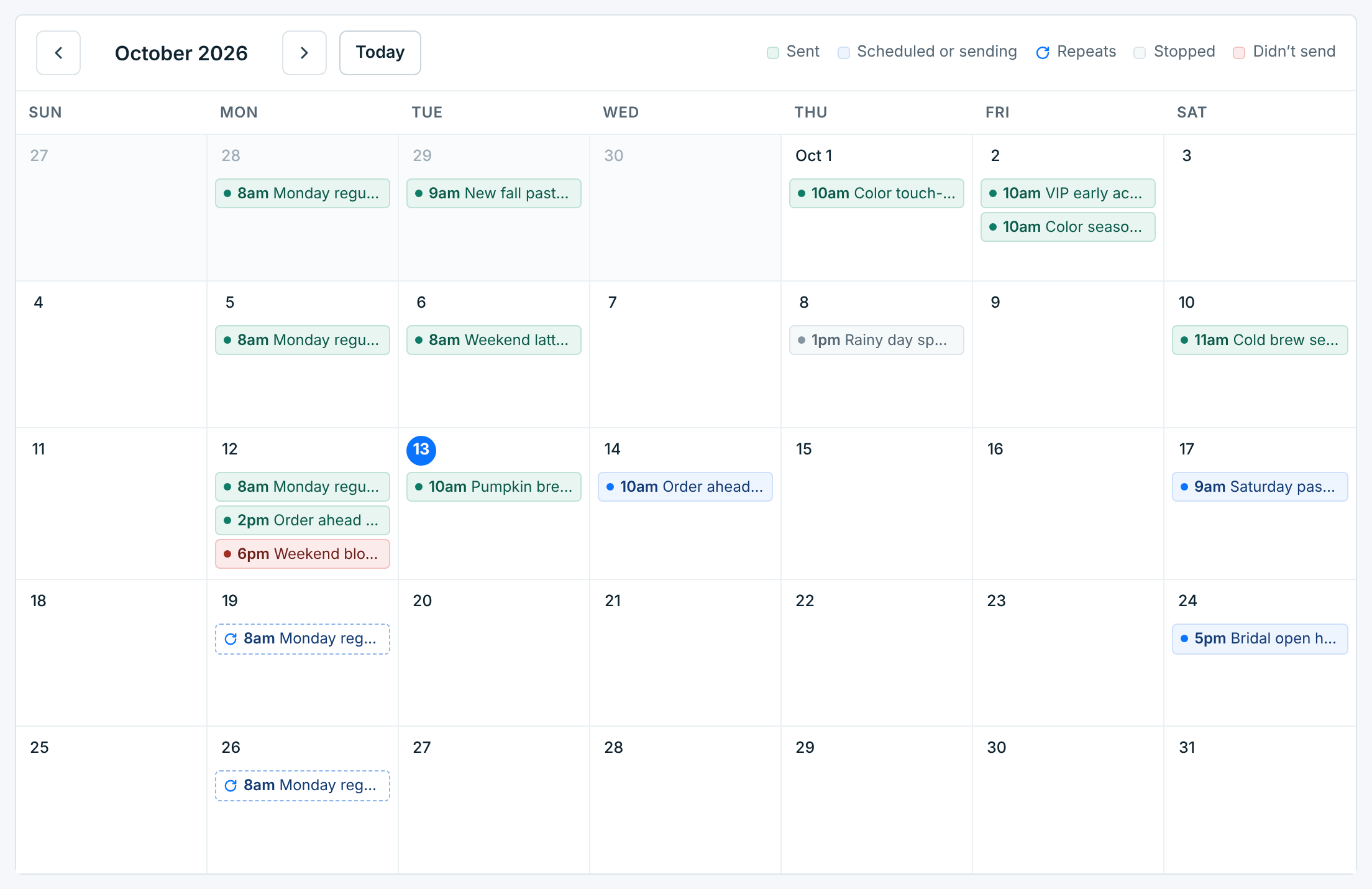
Green ones were sent, blue ones are scheduled or sending, grey ones were stopped, and red ones didn’t send; the key above the calendar says the same. A dashed one with the repeat mark is a coming send of a recurring campaign. Click a campaign to open it, and use the arrows or Today to move between months. Drafts don’t show here.
Recurring campaigns#
Recurring lists the campaigns that repeat, 25 a page, newest first: what they repeat, their next send and how the last one went. The next send is in the same time as the list. With All businesses, a campaign that repeats on another clock says which, like Every Sunday at 10:00 AM PT, and its own time is under the next send.
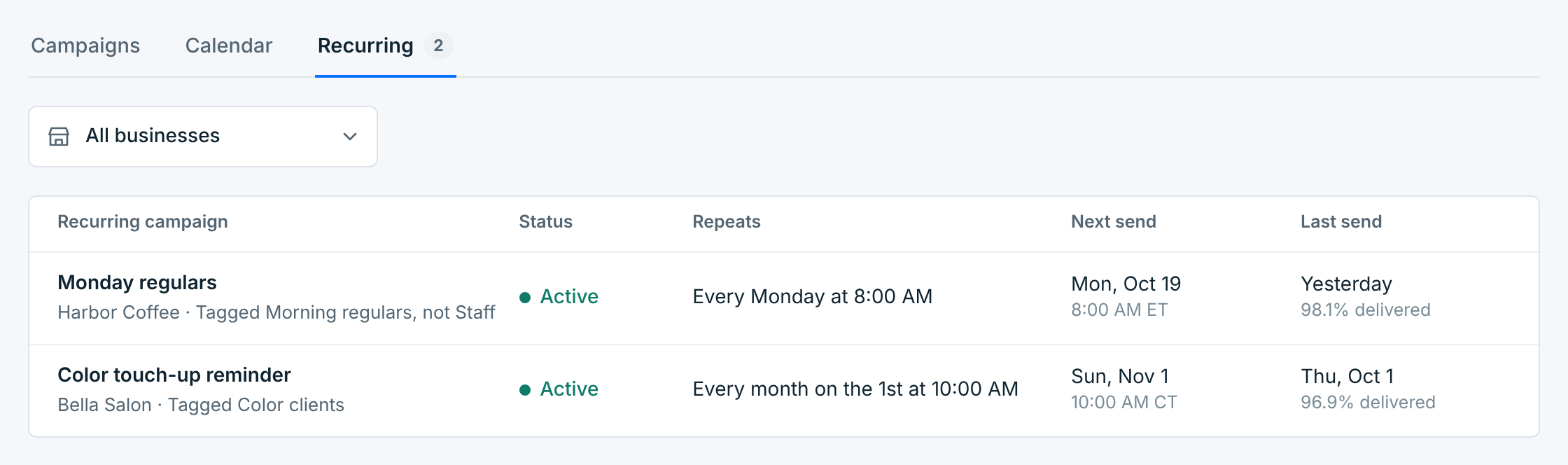
Each send of a recurring campaign is a campaign of its own on the list, marked Repeats, with its own results. See Recurring campaigns.